
CUCM call reporting your whole organization can actually use
CallManager records every call, but Cisco’s built-in CDR tool makes those records slow to search and hard to read. VoIP Detective takes the same records and turns them into reports anyone can run: administrators troubleshoot with gateway, codec, and call-quality details, managers see their team’s calls, and end users look up their own. Deploy the virtual machine, point CallManager at it, and reports start filling in as soon as the first records arrive.
Built for CallManager
- Reads CUCM’s own CDR and CMR records, so every call, device, and quality metric is the real thing, not an estimate.
- Runs as a virtual machine on your existing hypervisor. No agents on phones, no changes to CallManager beyond adding a billing server.
- Lite is free with no expiration. Pro adds unlimited retention, scheduled reports, and support, and is one license key away.
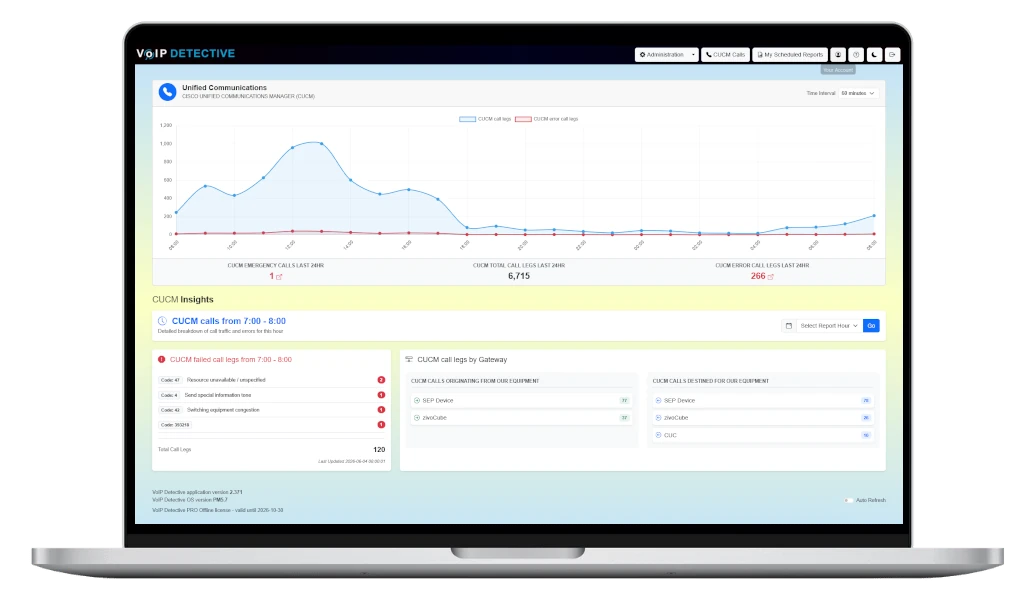
Why teams choose VoIP Detective
- Every call, searchable. Calling and called number, duration, device, gateway, codec, jitter, and packet loss, across sixteen reports that go from a single extension to the whole cluster.
- Reports that run themselves. Schedule any report to land in a manager’s inbox on the day and time you choose, as PDF, XLSX, or CSV.
- Your data stays on your network. VoIP Detective runs in your own environment; call records never leave your site. Phone numbers can be masked for GDPR.
- No per-user pricing. Unlimited administrators, managers, and self-service end users on both Lite and Pro.
- Drill down from anywhere. Every count in every report links to the calls behind it, so a manager’s summary becomes an administrator’s call list in one click.
“If you use CUCM’s CDR search tool for troubleshooting, VoIP Detective will make you wonder how you ever managed without it. I use it daily to troubleshoot and also as a SIP trunk utilization monitoring tool. The software is rock solid and the customer service is outstanding.”
“Works right out of the box, and super easy to customize. VoIP Detective has been an indispensable tool for both our sales managers and telecom admins for years; ad-hoc searches and scheduled reports are clear and usable for end users, and administrators are able to drill down into more technical information about endpoints, gateways, and call quality. The value of this package is simply in another league compared to competing products.”
Why Choose VoIP Detective?
Unlike generic reporting tools, VoIP Detective is purpose-built for Cisco Call Manager. It’s lightweight, easy to deploy, and designed for both IT teams and end users. With fast performance, clear visuals, and powerful filtering, you get insights without the complexity.
Get started today and take control of your CUCM call data.
- Download VoIP Detective’s virtual machine using the “Install VoIP Detective Now” link in the upper right corner of this page.
- Deploy the virtual machine, and step through the installer and activate Call Manager reporting
- Add your VoIP Detective installation to CallManager as a “billing server” and Call Manager will begin to send call records.
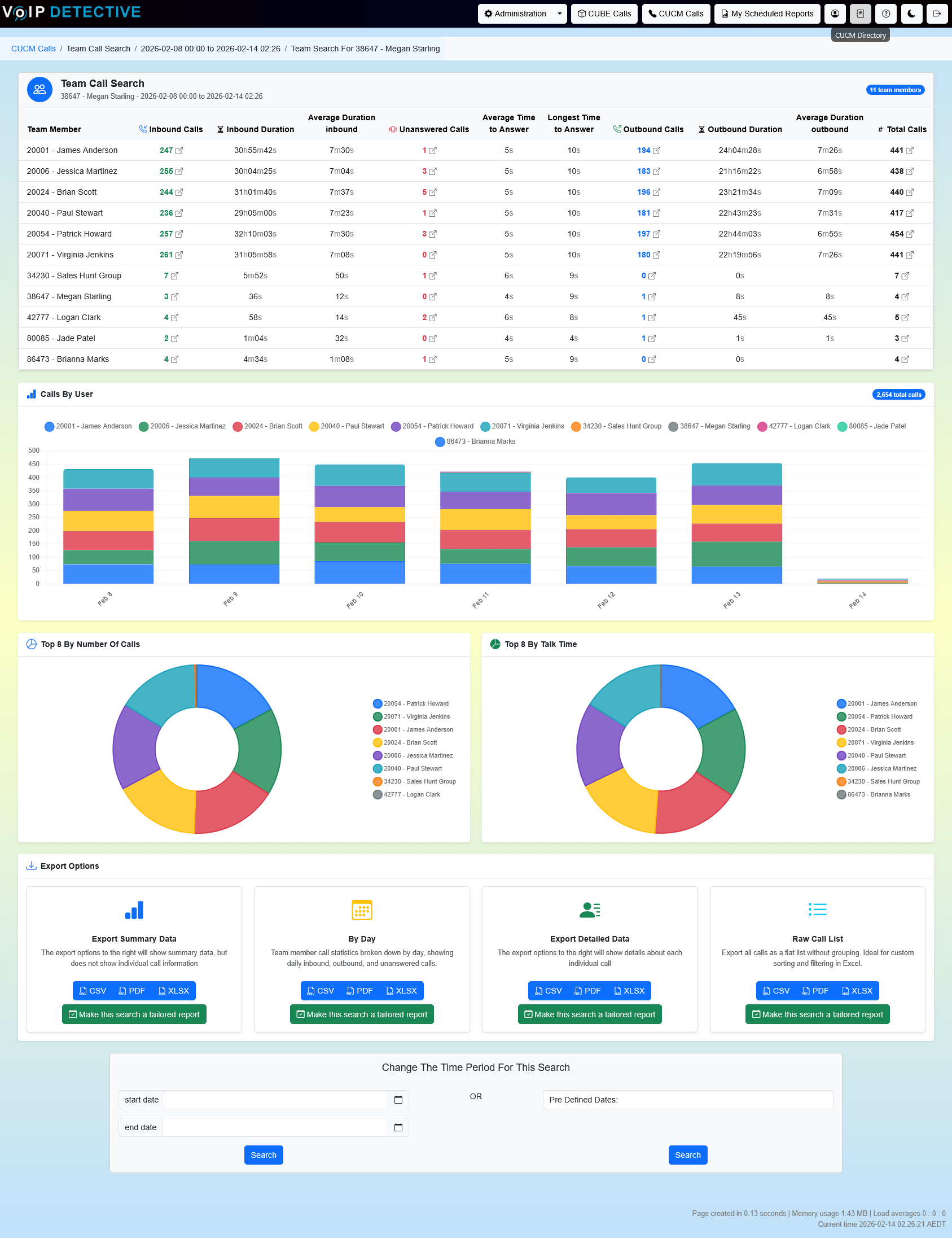
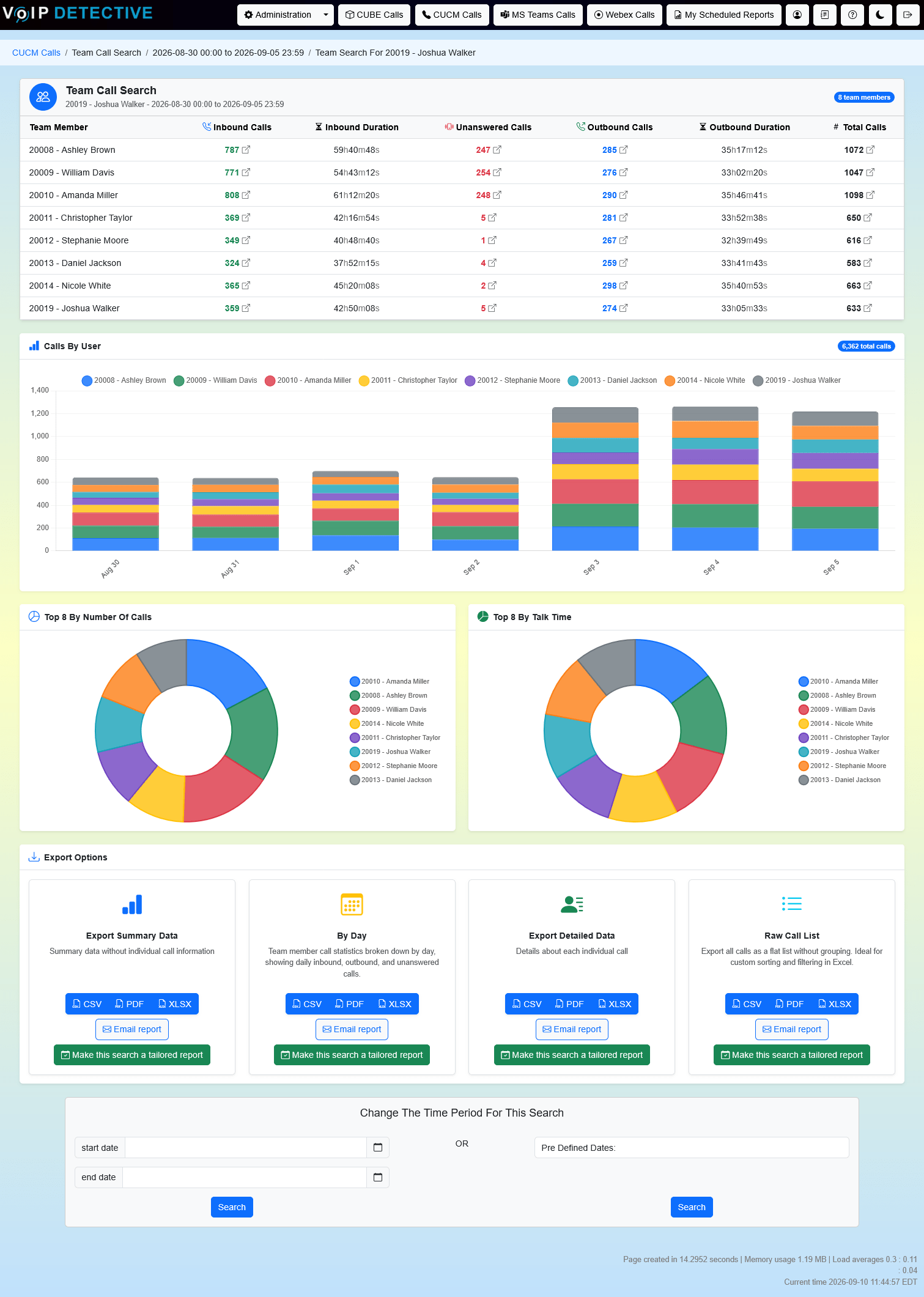
Managers will love our Team Report. Quickly see your entire team’s performance and drill down into specifics.
Pricing Plans
VoIP Detective CUCM Reporting is available in a Lite version and a Pro version. Upgrading from the Lite version to Pro is as easy as installing a new license key.
Lite
$Free / mo
- No expiration or time limit
- Includes CUCM, Webex Calling, and MS Teams reporting
- Imports call records on a single worker, which keeps up with most small and mid-sized systems
- No limit to the number of devices
- Stores your most recent 7 days of call data
- No limit to the number of users, managers and administrators you can create
- Free upgrades forever
- Team, Hunt Group, Inbound, Outbound, and All Calls reports, plus the Administrator search
- Admins can see error calls and isolate problems before they impact users
Pro
$1499 / year
- Everything that is included in the free version of VoIP Detective
- Integrates with CUCM, Webex Calling, MS Teams, and CUBE
- Imports call records on multiple workers in parallel, so high call volumes show up in reports within minutes
- Store millions of call records (no time or retention limits on data)
- Email alerts for emergency calls
- Schedule automated reports to be emailed at the time you choose
- Data privacy / GDPR compliant (mask phone numbers from users)
- UCCX Wallboard included
- Ticket-based support and all upgrades included
Sample CUCM reports produced by VoIP Detective
VoIP Detective offers a number of reports for Cisco Unified Communications Manager (CUCM). This page outlines at a high level our available reports. If you have any questions, feel free to browse our video library, or you can ask us directly.
Click any report to jump to its details, or scroll down to see all of them.
PopularHunt Group ReportAnswer rates, queue wait times, and which member handled each call.
PopularAdministrator ReportSearch every call in your cluster, with gateway, codec, and quality details.
Inbound Call ReportCalls to an extension, hunt group, call center, or pickup group, including unanswered.
Outbound Call ReportEvery call placed from an extension, user, or group.
Busy Hour ReportFind your busiest and quietest hours to plan staffing.
All Calls ReportA simple list of every call to and from a single number.
Department ReportEvery call to or from a whole department, using the department field from CUCM.
Top Talkers ReportRank your busiest extensions or devices by call count over any period.
Network Quality ReportLocate calls and devices with jitter, latency, or packet loss.
Gateway Utilization ReportPeak concurrent calls across gateways, trunks, and CUBEs.
Endpoint Utilization ReportSpot phones that haven’t made a call and reclaim licenses.
Total System Usage ReportA summary of all calls across your phone system for any period.
CUBE AnalyticsSearch and report on every call through your CUBE, including rejected calls.
Range Summary ReportSummarize calls to or from a whole range of numbers, like 4XXXX.
Client Matter Code ReportMatch calls to client accounts if you use CMCs.
Administrator Report
The administrator report is designed to allow the system administrator to search any call across CUCM without restriction. Standard data is returned, such as calling number, called number, duration, etc, as well as technical information such as gateway used, codec, network conditions, etc. This report can be viewed inside of the VoIP Detective web interface, or exported.
The search interface, as well as sample output from an “admin” report:
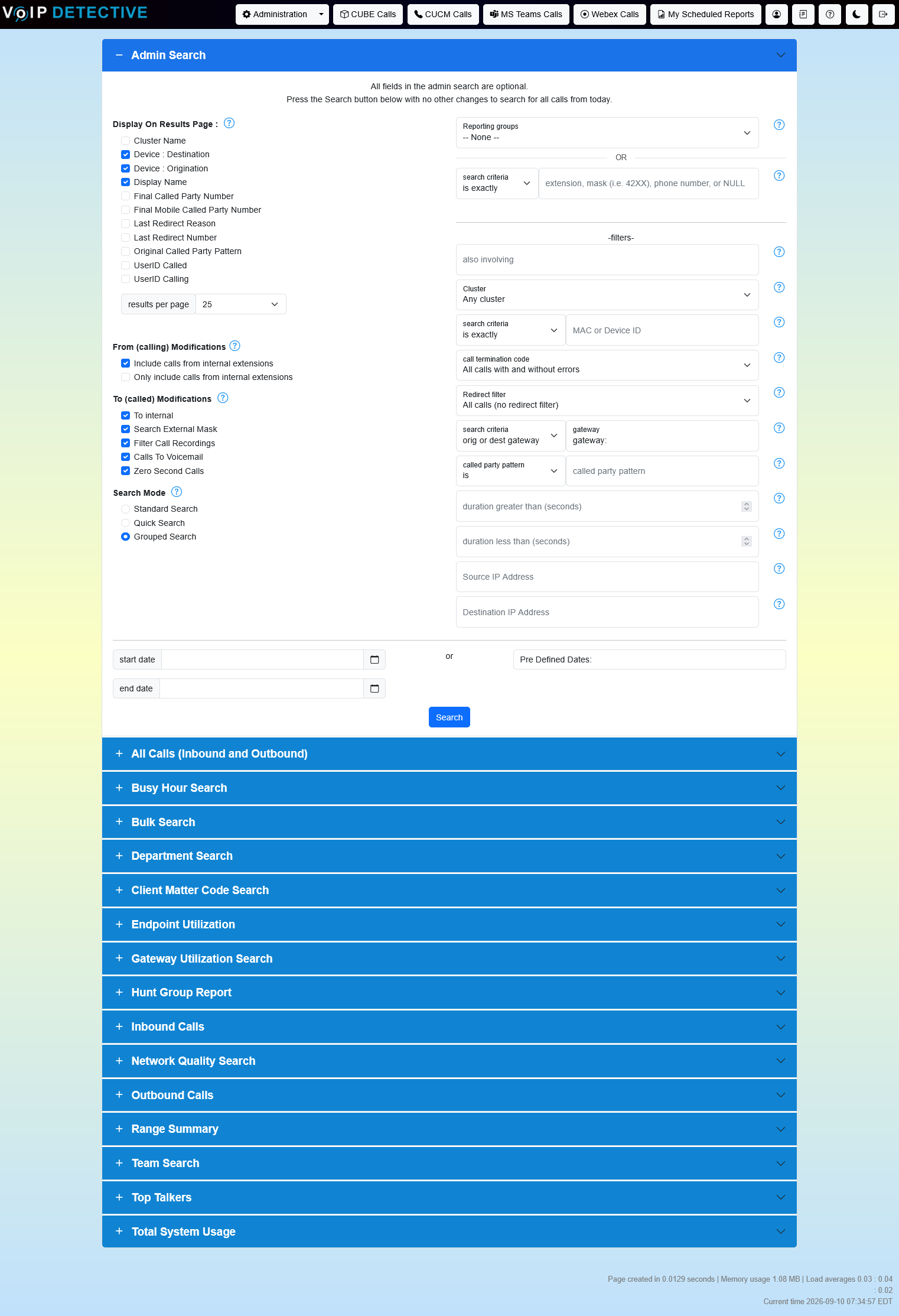

VoIP Detective Free can export this report into CSV, while VoIP Detective Pro can export to CSV, XLSX, and PDF.
All Calls (Inbound and Outbound) Report
The All Calls report is designed to pull a very simple list of all calls to and from a single number. Using this report you’ll see every call associated with the number you choose.
The search interface, as well as sample output from an “all calls” report:
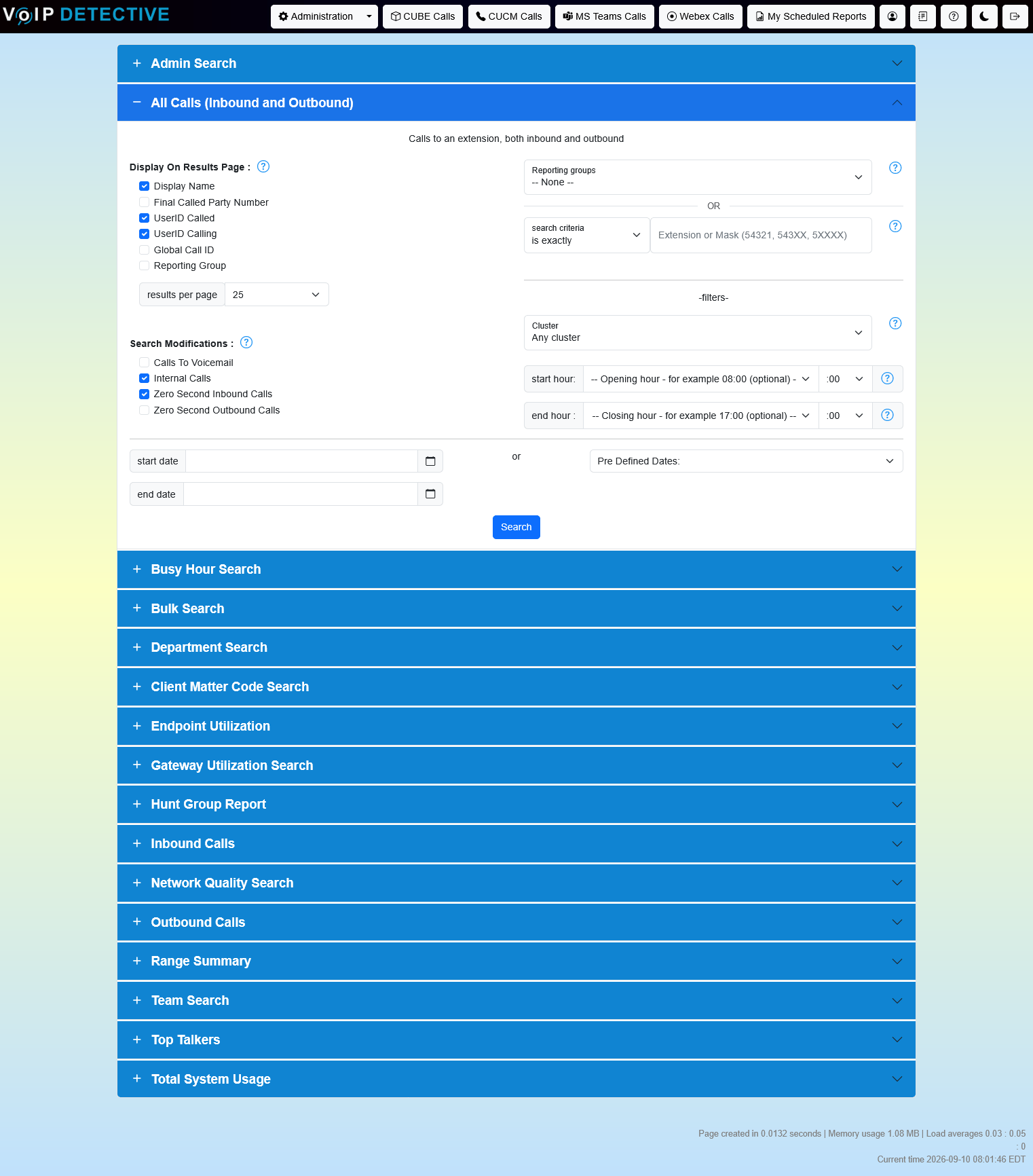
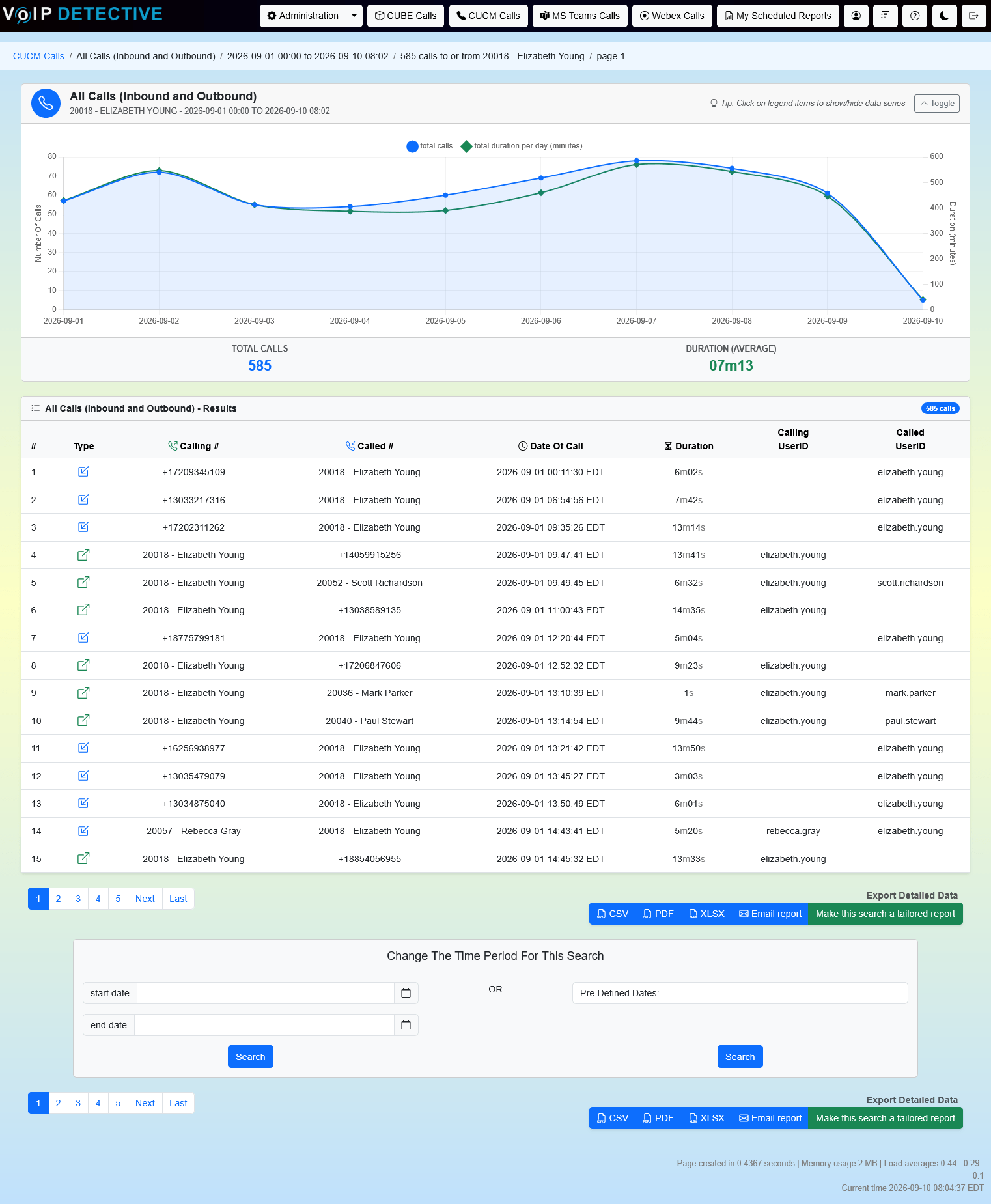
VoIP Detective Free can export this report into CSV, while VoIP Detective Pro can export to CSV, XLSX, and PDF.
Busy Hour Report
The Busy Hour Report is designed to give a summary of calls to and from an extension, grouped by hour. This can be crucial for staffing and scheduling of call centers, front desk or support lines.
The search interface, as well as sample output from a “busy hour” report:
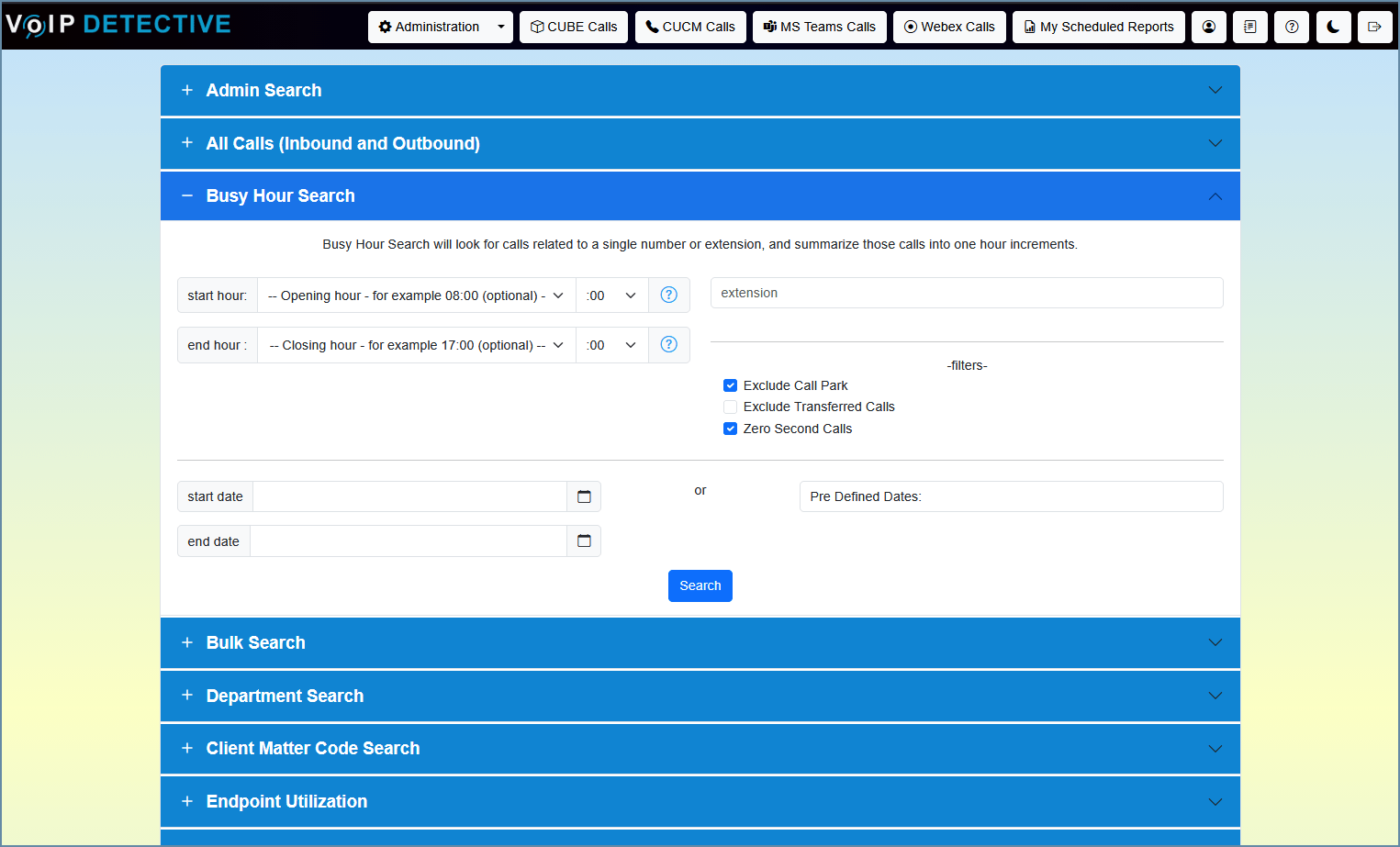
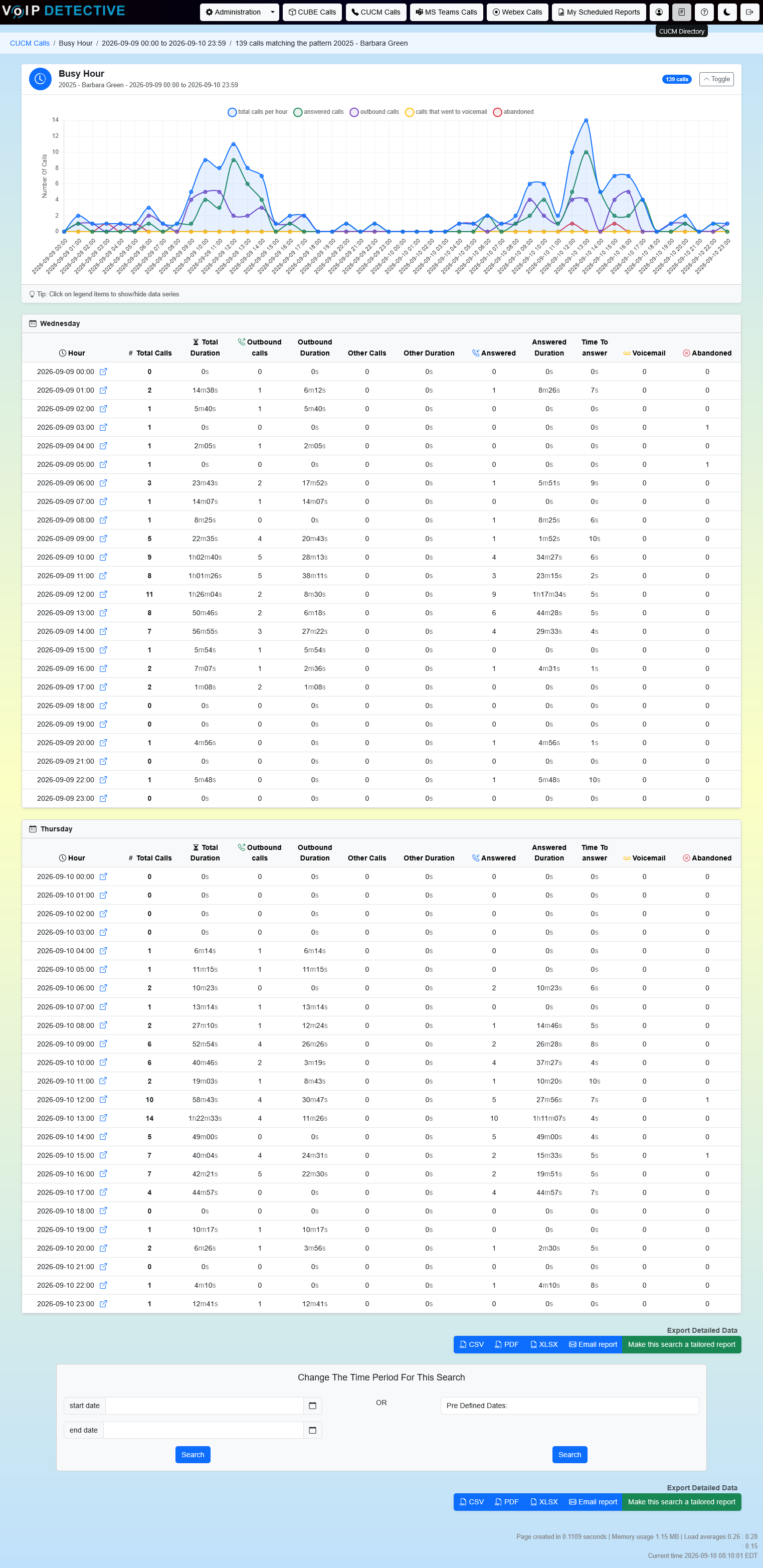
This report is exclusive to VoIP Detective Pro, where it can be exported to CSV, XLSX, and PDF.
Client Matter Code Report
If your organization uses client matter codes (CMCs) to track calls and correlate them to specific customers or accounts, VoIP Detective can help.
The search interface, as well as sample output from a “client matter code” report:
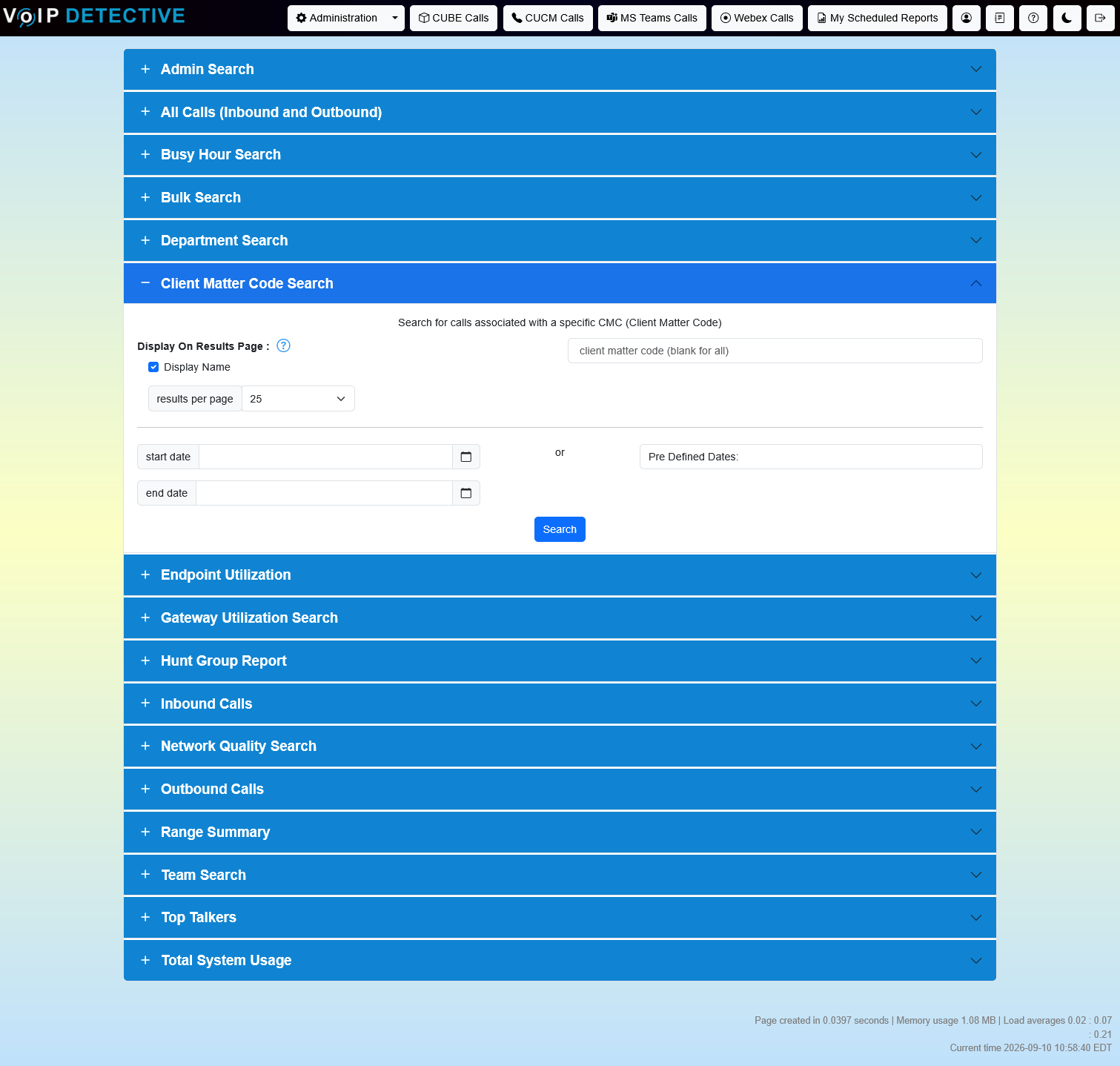
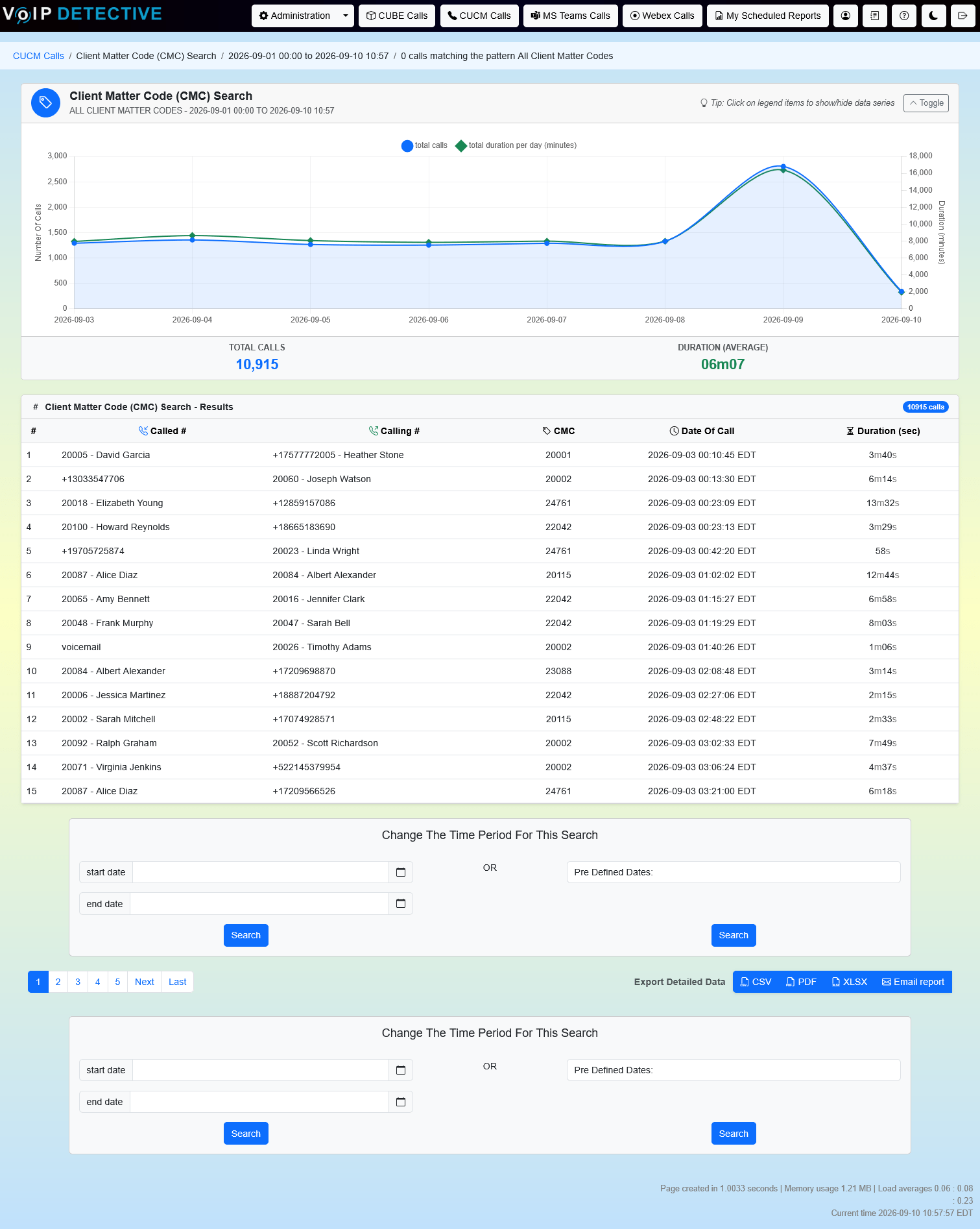
This report is exclusive to VoIP Detective Pro, where it can be exported to CSV, XLSX, and PDF.
Department Report
The Department Report shows every call to or from the members of a department, without you having to build a team or list extensions by hand. It uses the Department field already set on each user in CUCM, so if your End User pages are filled in, the report is ready to run. Pick a department and a date range, optionally limit to business hours, and you’ll get a call chart, the full call list, and exports summarized by member or by day.
The search interface, as well as sample output from a “department” report:
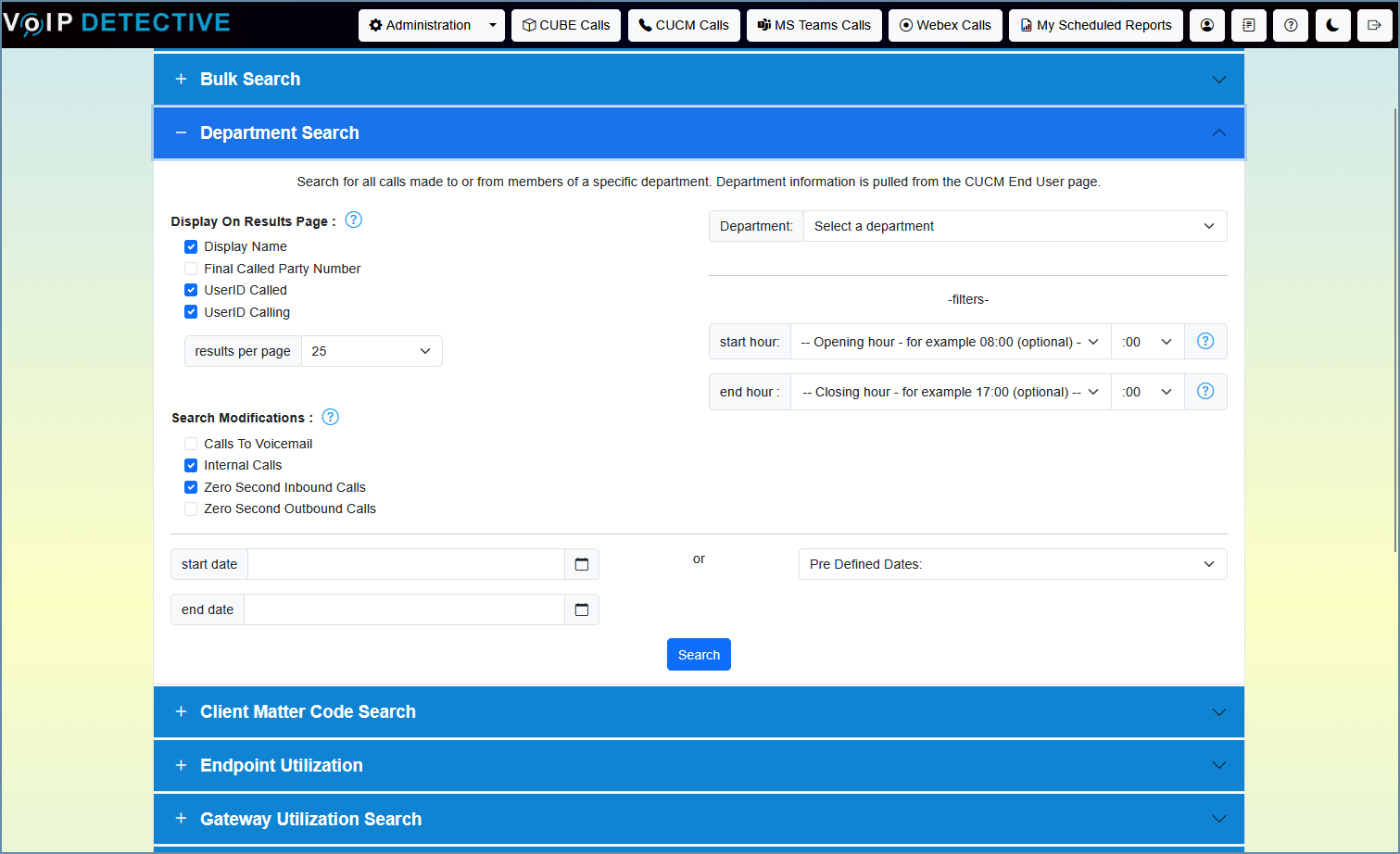
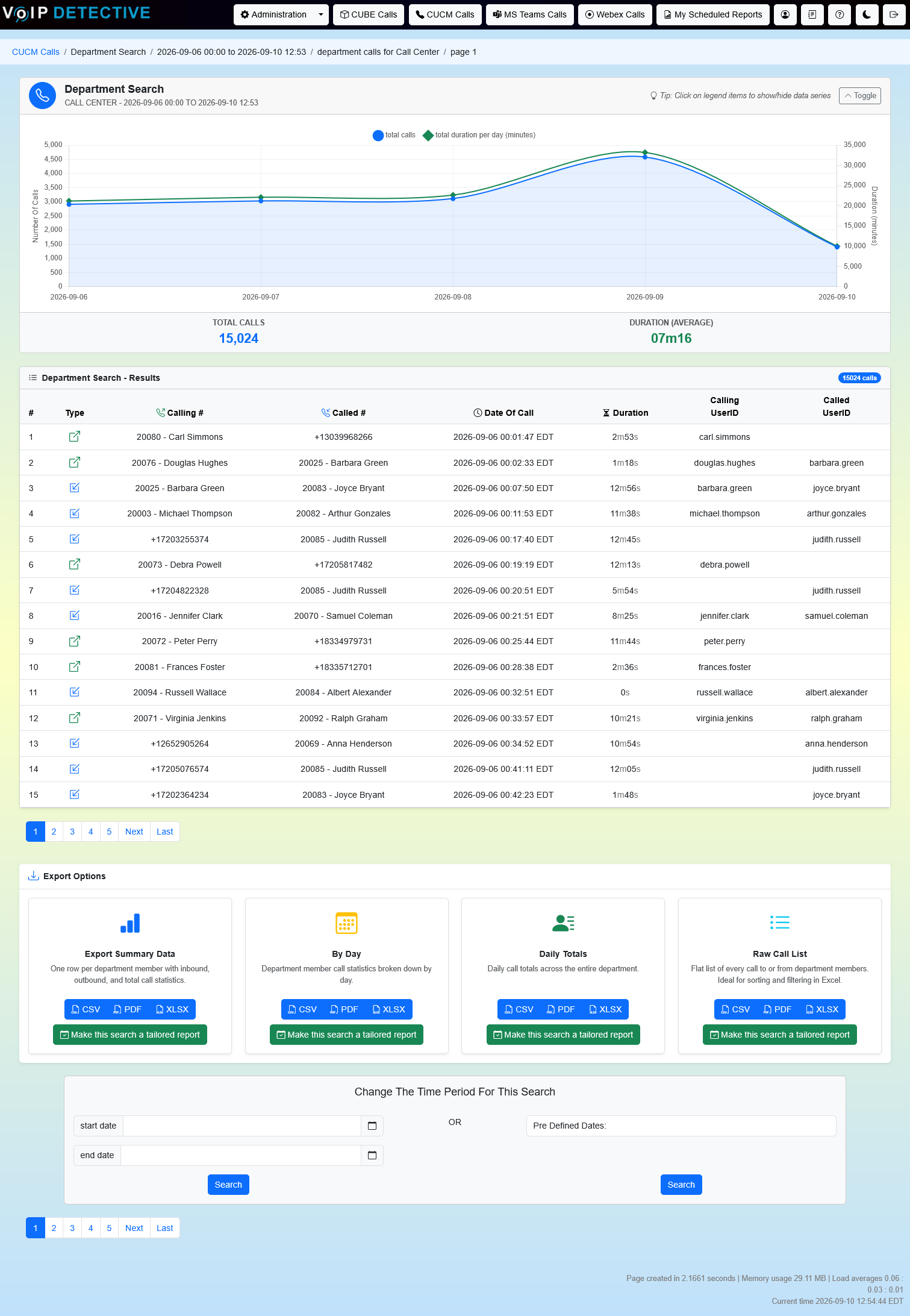
The Department Report offers four exports: Summary (one row per member), By Day, Daily Totals, and Raw Call List. VoIP Detective Free can export each to CSV and searches the last two weeks, while VoIP Detective Pro can export to CSV, XLSX, and PDF, search any date range, and schedule any of them as a tailored report delivered to your inbox.
Endpoint Utilization Report
The Endpoint Utilization Report (EUR) compares all devices and endpoints that are configured in your CUCM with the database of calls stored in VoIP Detective. This will show the last time a call was made by each device. This report makes it easy to identify devices that have not recently made a connection, so you can remove devices that are not needed and reclaim those (always needed!) licenses.
The search interface, as well as sample output from an “endpoint utilization” report:
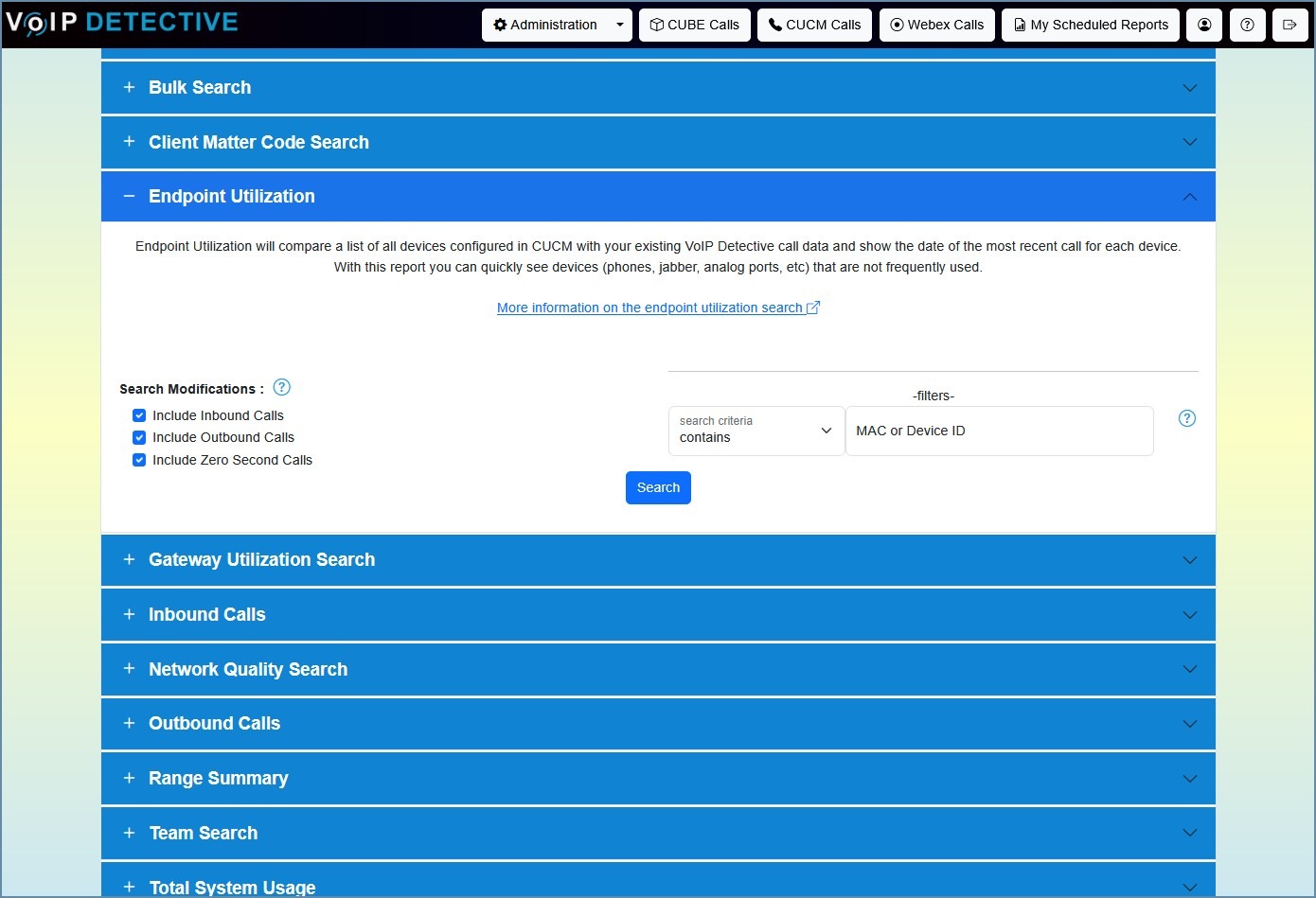
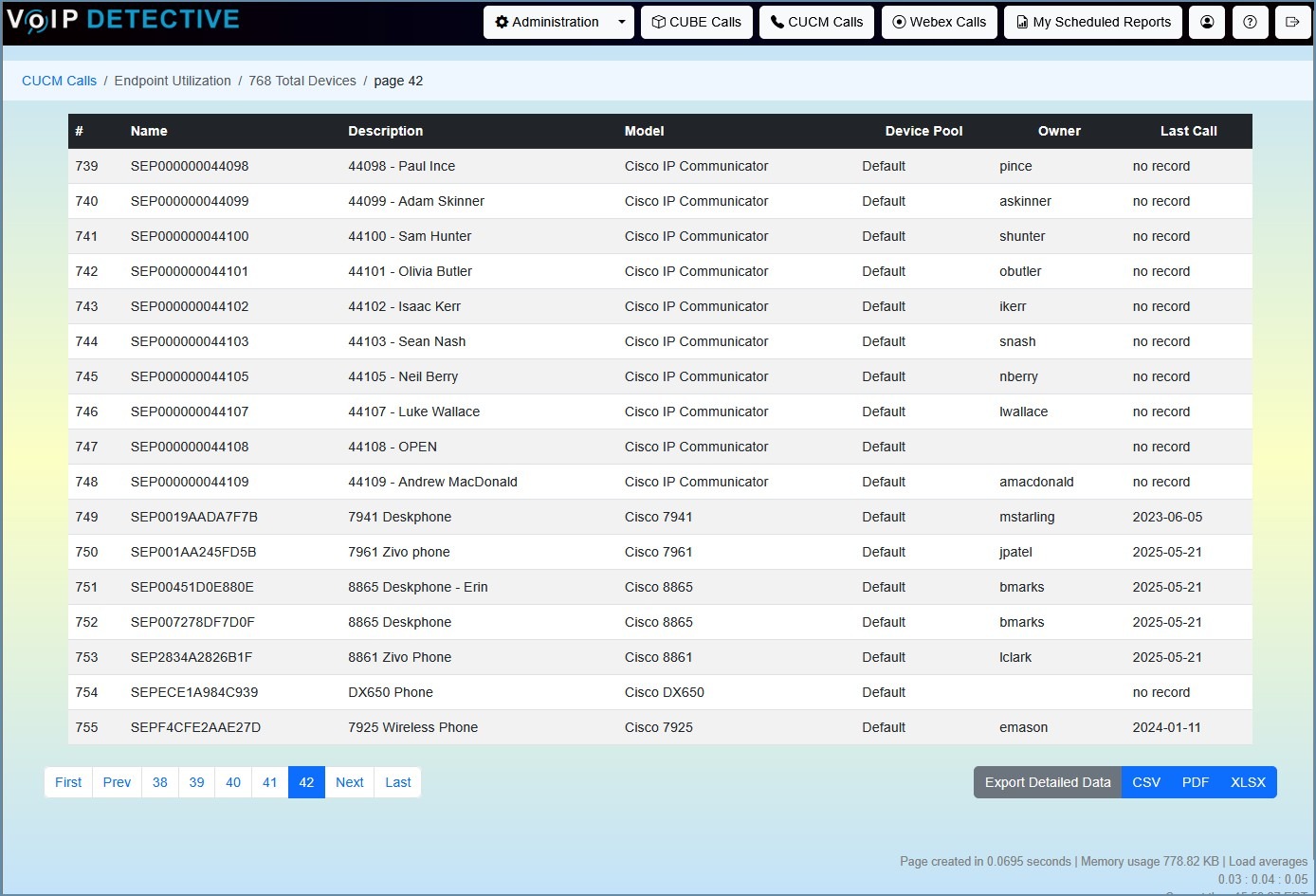
This report is exclusive to VoIP Detective Pro, where it can be exported to CSV, XLSX, and PDF.
Gateway Utilization Report
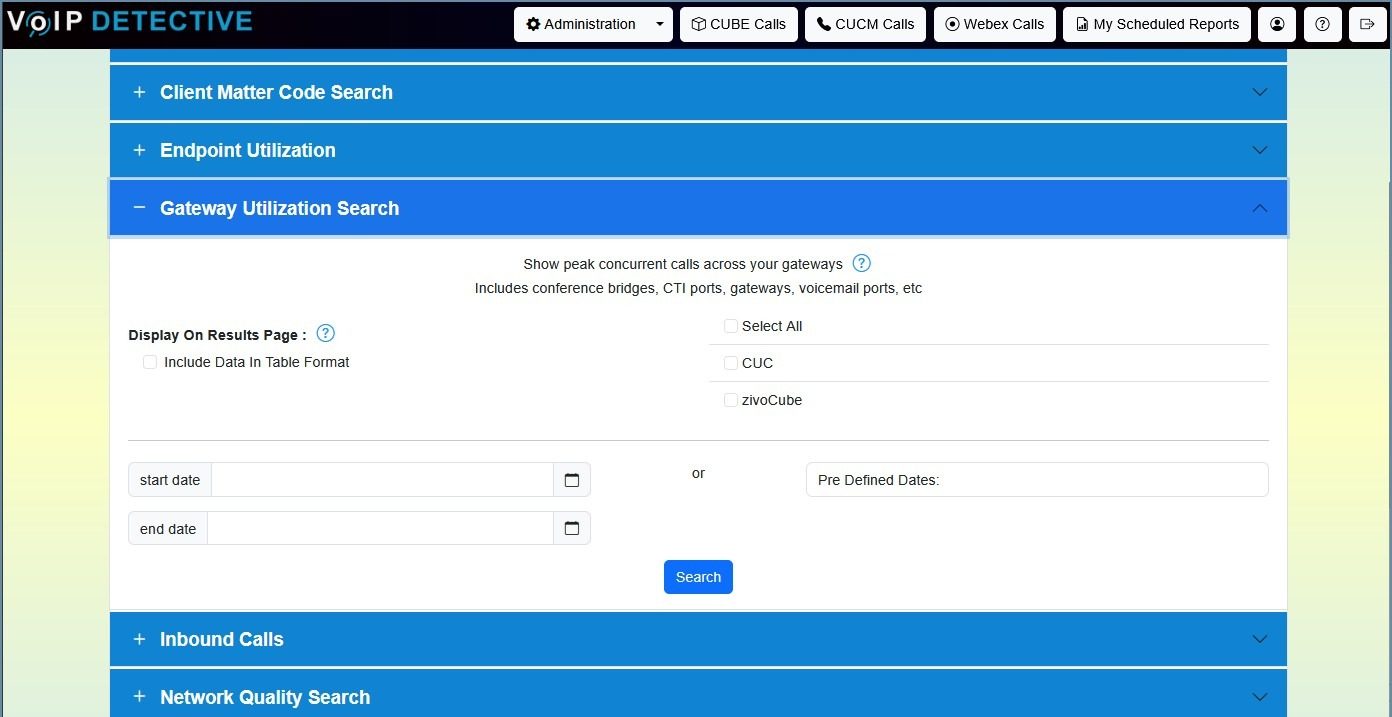
Show peak concurrent calls across your gateways, including CUBEs, PRI gateways, conference bridges, CTI ports, and voicemail ports. This report is ideal for capacity planning.
The search interface, as well as sample output from a “Gateway” report:
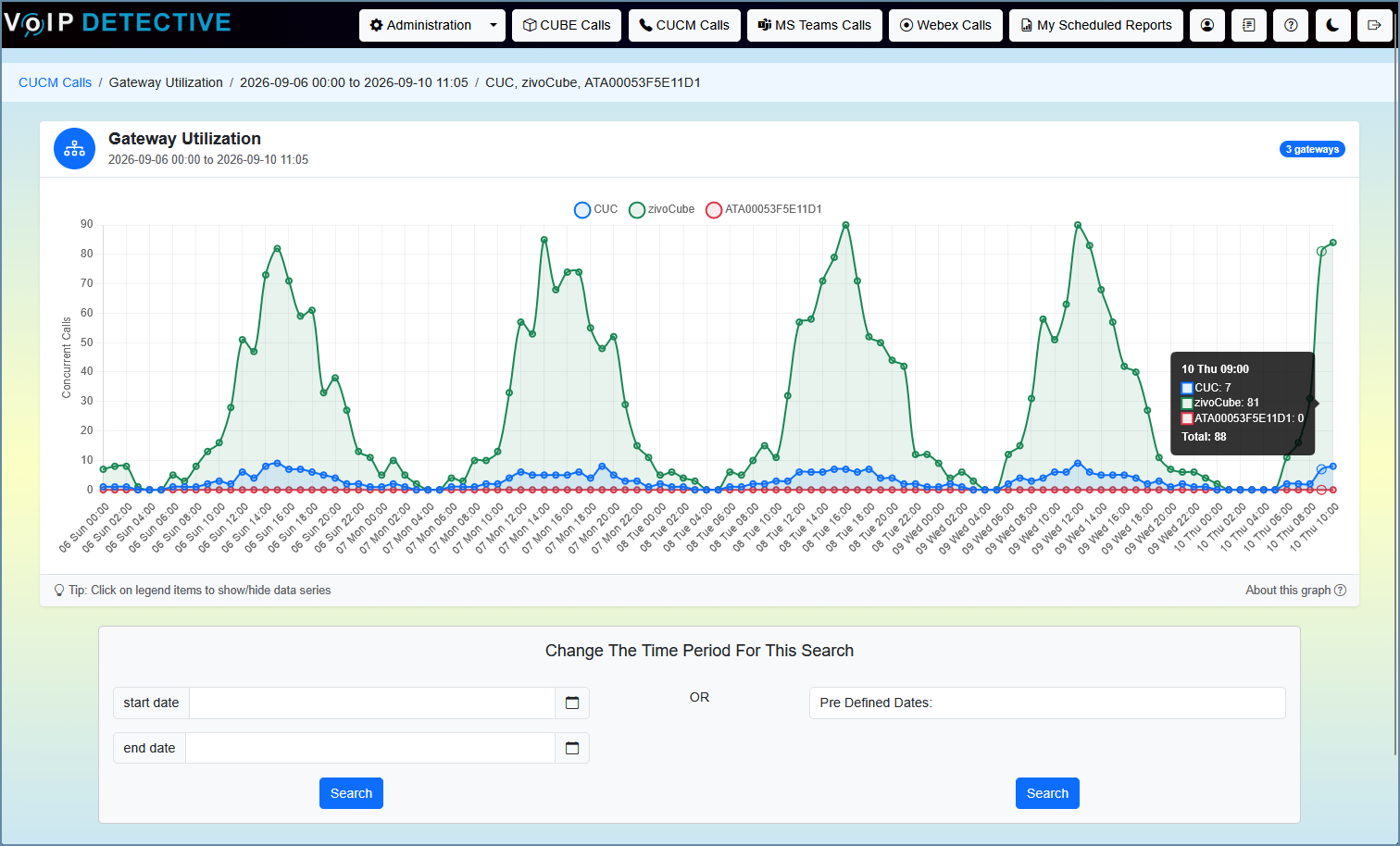
This report does not have associated export options.
Hunt Group Report
The Hunt Group Report shows how calls flow through a CUCM hunt pilot. Pick a hunt pilot and a date range, and you’ll see which extension or device handled each call, how long callers waited in queue, how many members a call rang before it was answered, and whether calls were answered or missed. Results can be grouped by extension (best for managers) or by device (best for troubleshooting), and can be limited to business hours.
The search interface, as well as sample output from a “hunt group” report:
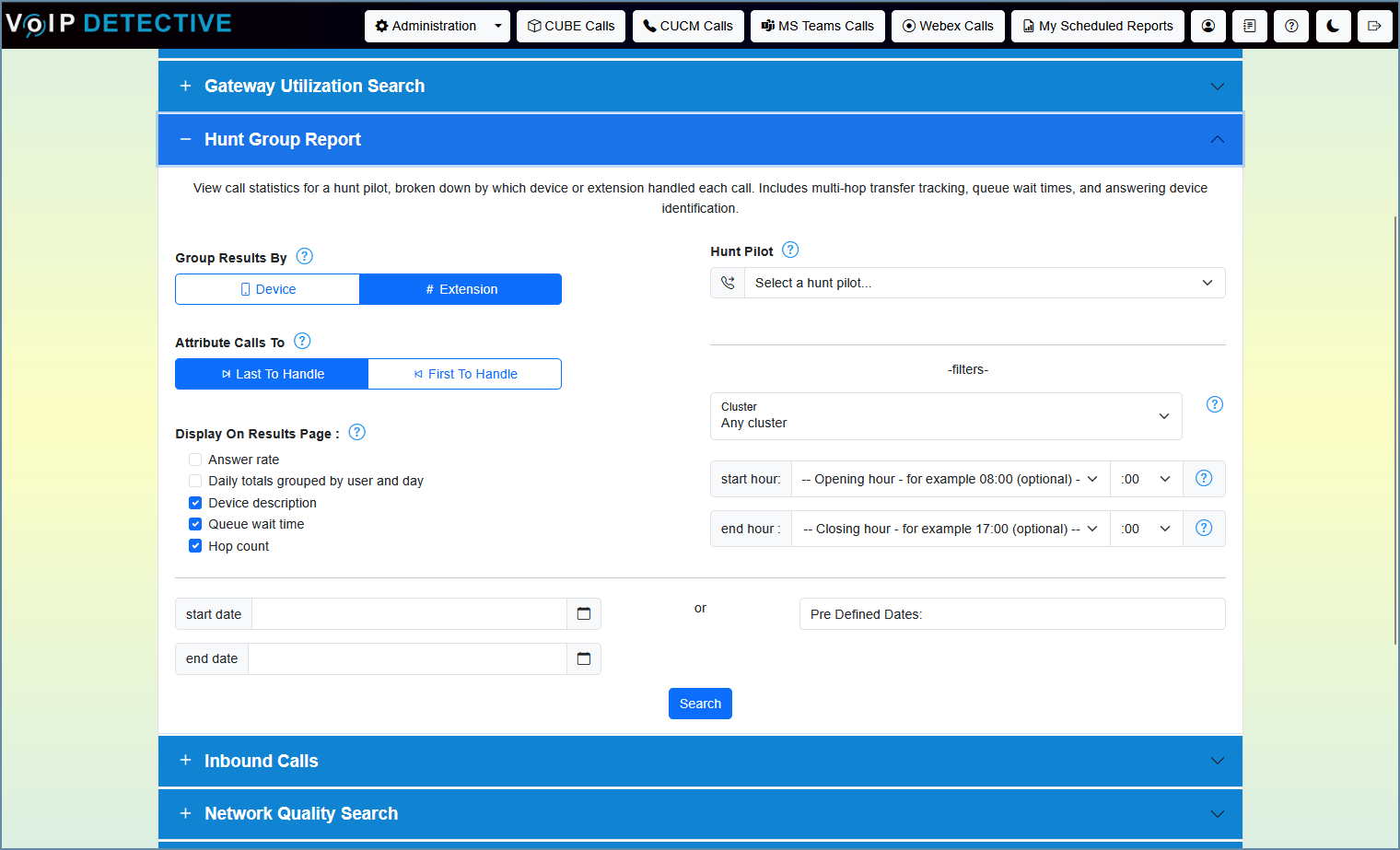
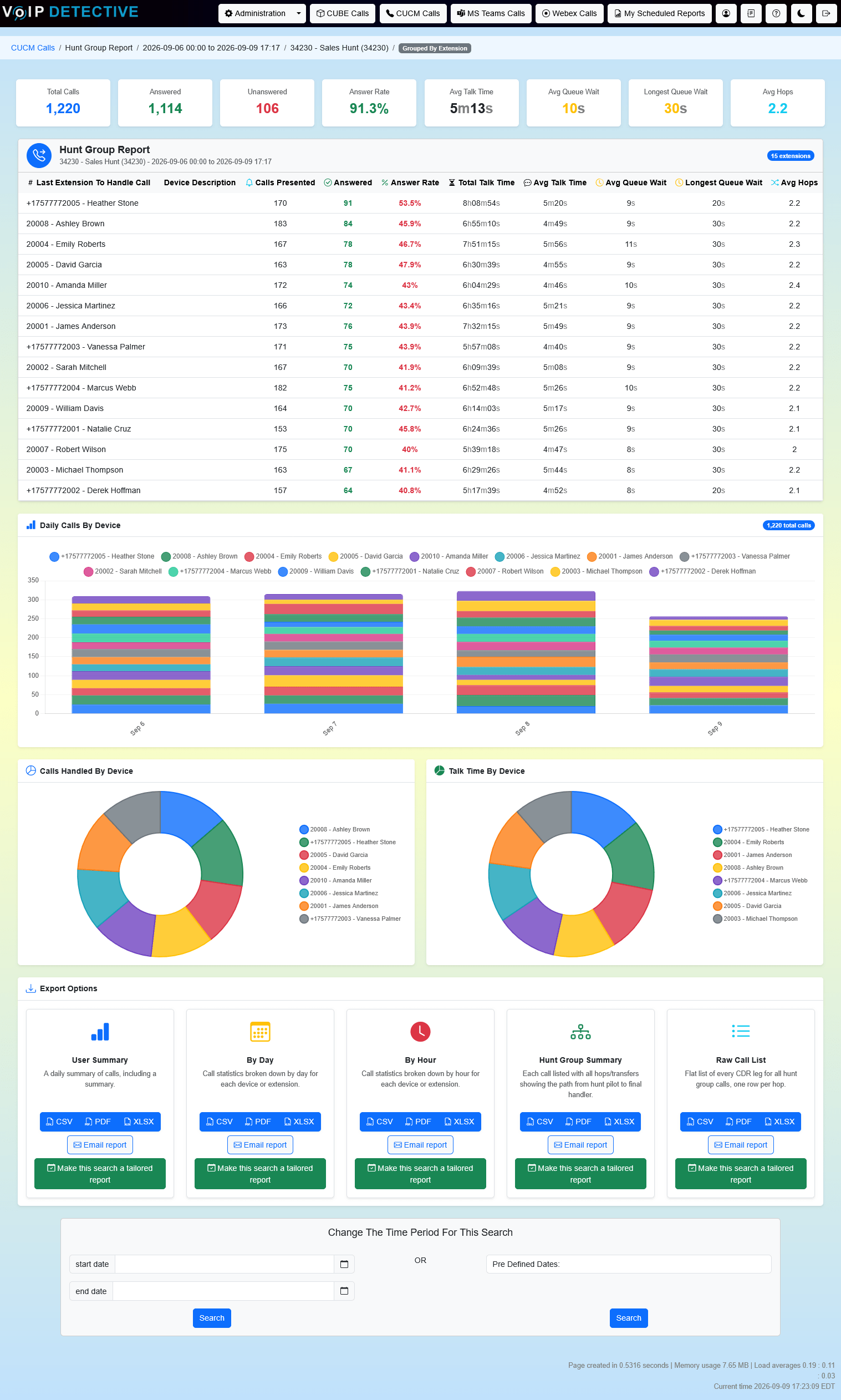
The Hunt Group Report offers five exports: User Summary, By Day, By Hour, Hunt Group Summary, and Raw Call List. VoIP Detective Free can export each to CSV, while VoIP Detective Pro can export to CSV, XLSX, and PDF, and can schedule any of them as a tailored report delivered to your inbox.
Inbound Call Report
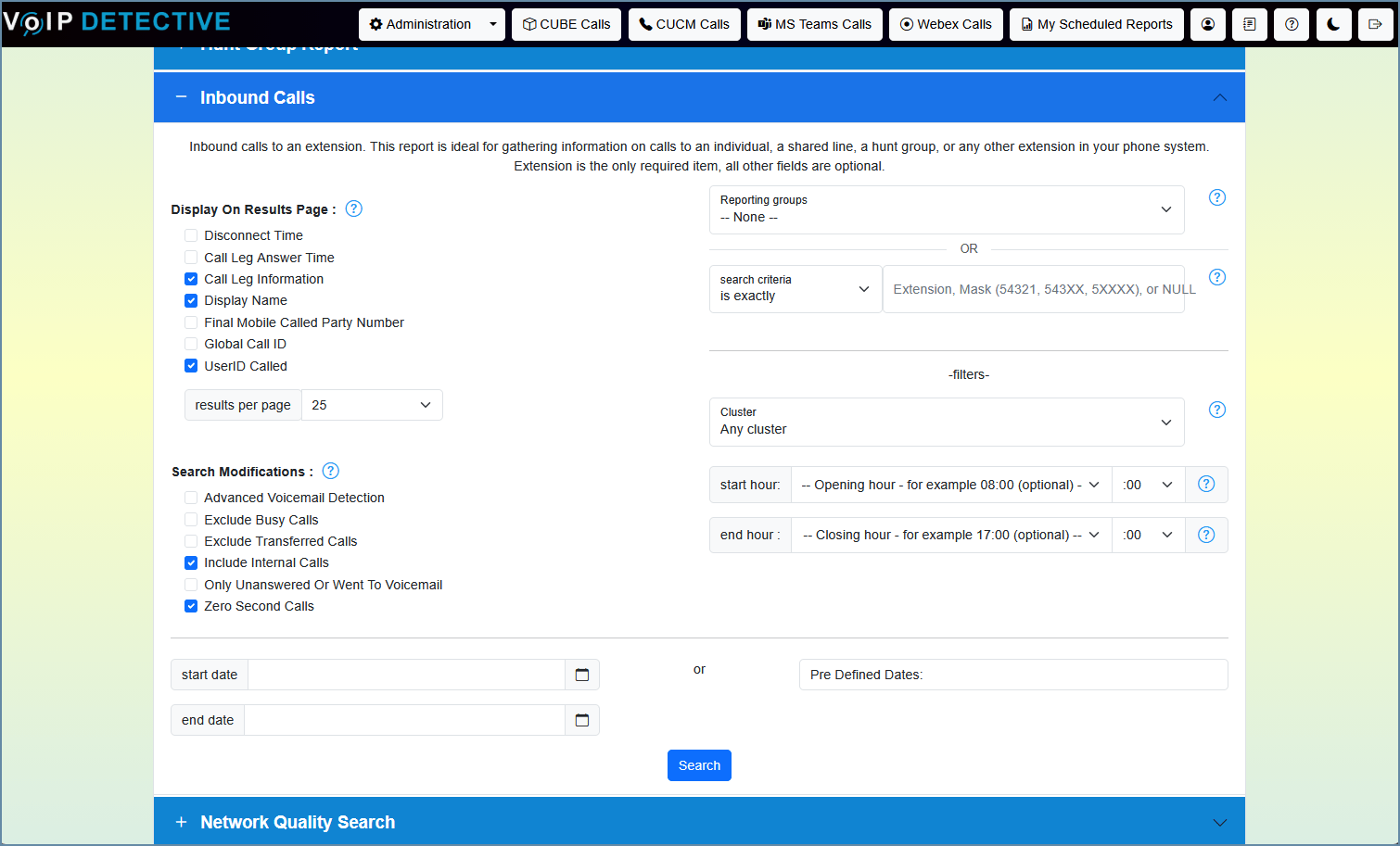
The inbound call report can be run for a single extension or number in order to show calls that were directed to that line. This number can also be run for a hunt group, call center, shared line, or call pickup group – when run in this fashion, it will not only show calls, but the user associated with the device that answered the call. This report will also show calls that were unanswered, abandoned, or went to voicemail.
The search interface, as well as sample output from an “Inbound Call” report:
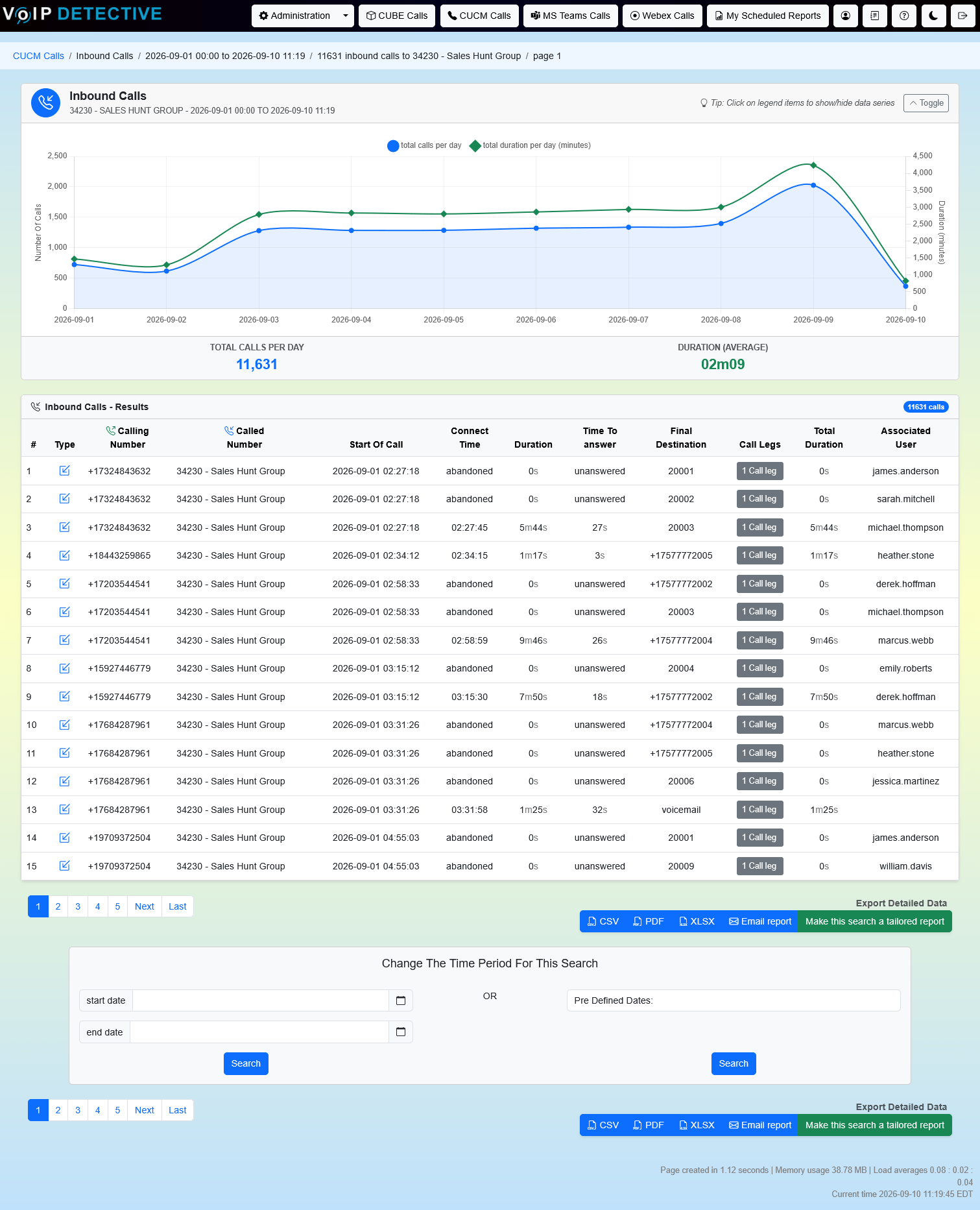
VoIP Detective Free can export this report into CSV, while VoIP Detective Pro can export to CSV, XLSX, and PDF.
Network Quality Report
The Network Quality Report is built for administrators, to allow you to search for calls with a specific amount of jitter, latency, or packet loss. You can choose one or more of these metrics to locate devices on your network that may experience poor quality calls.
Sample output from a “network quality” report:

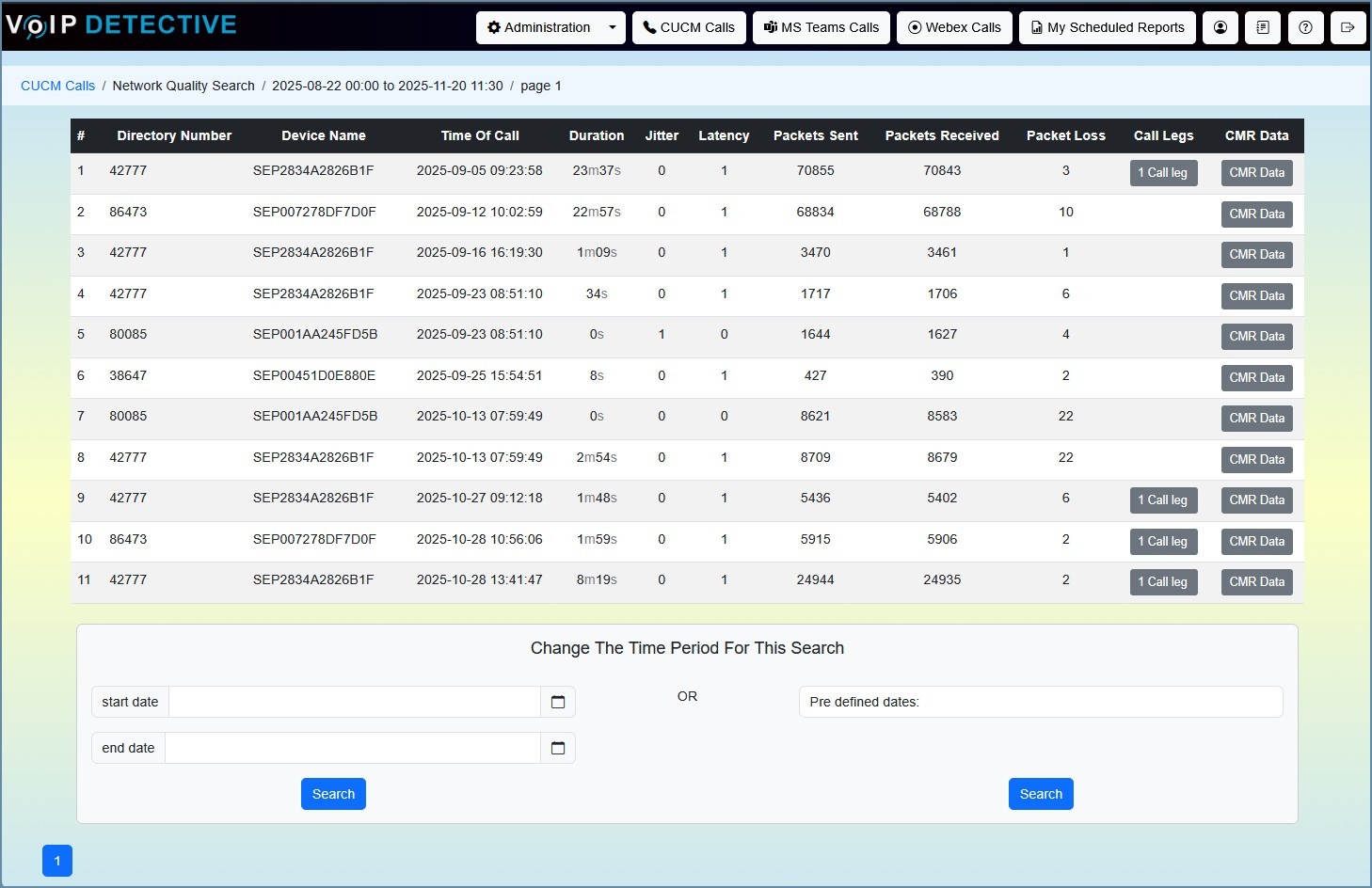
This report does not currently support exporting.
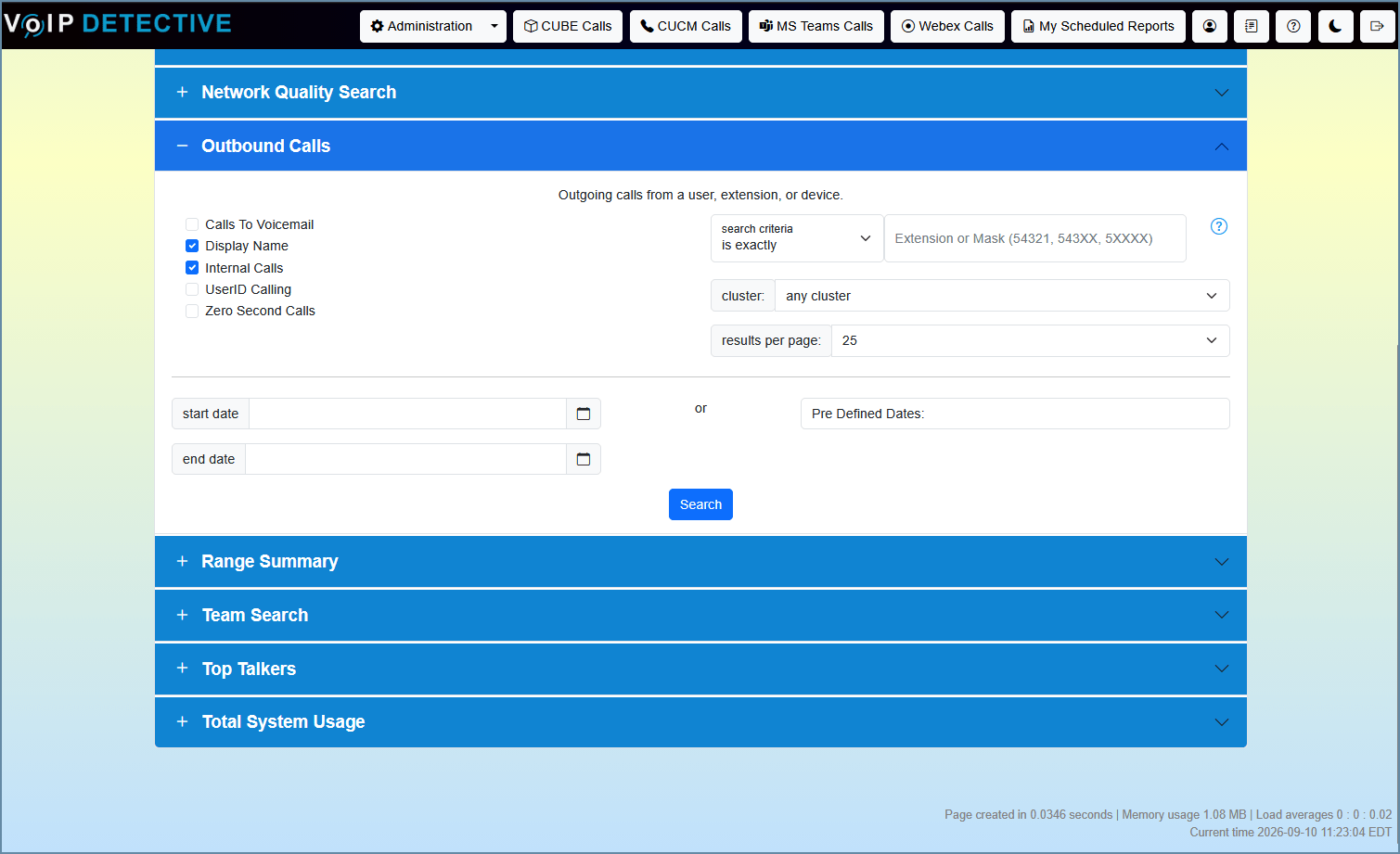
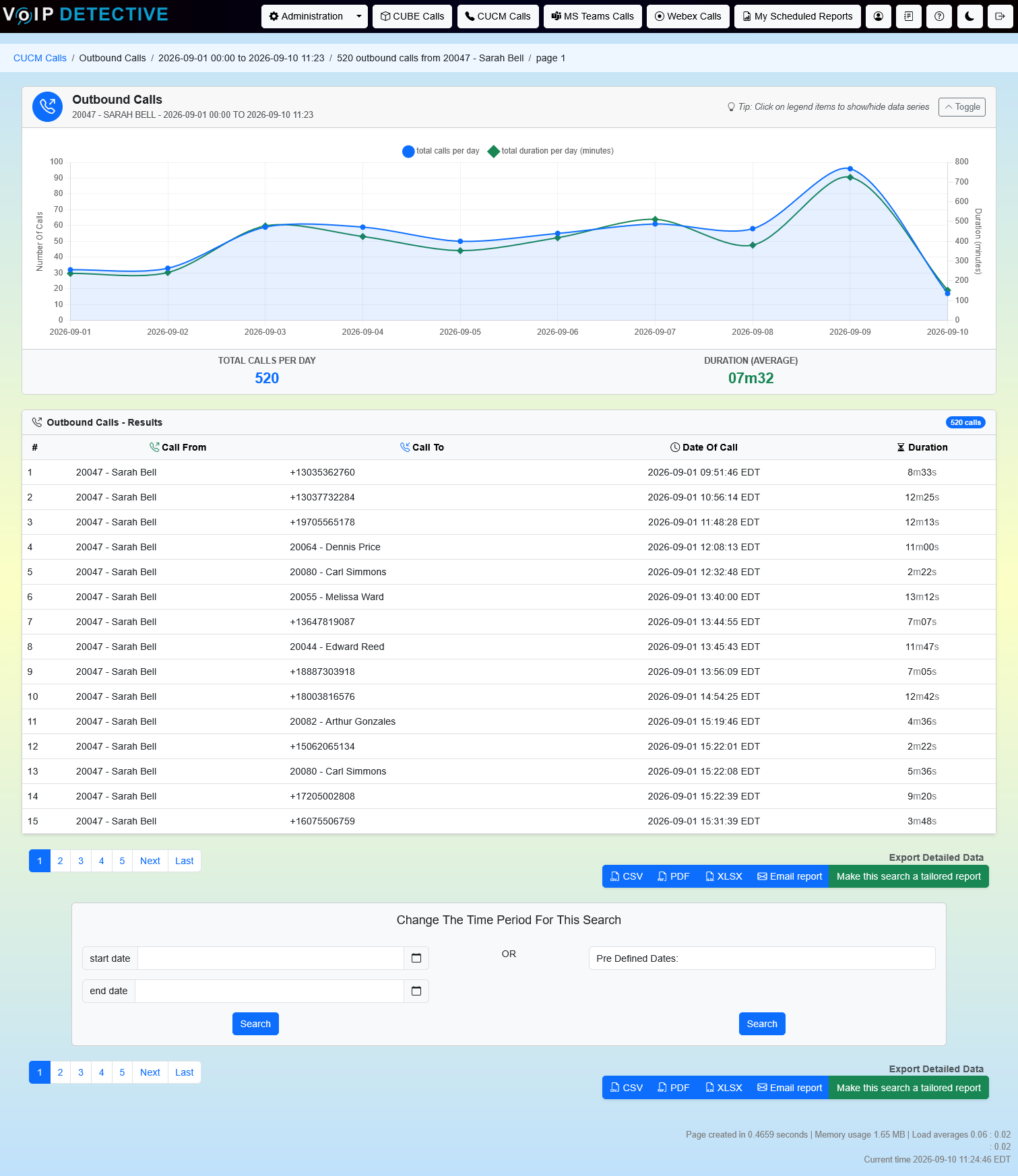
Outbound Call Report
Another straightforward report, the Outbound Call Report is designed to show calls from a particular extension
The search interface, as well as sample output from an “Outbound Call” report:
VoIP Detective Free can export this report into CSV, while VoIP Detective Pro can export to CSV, XLSX, and PDF.
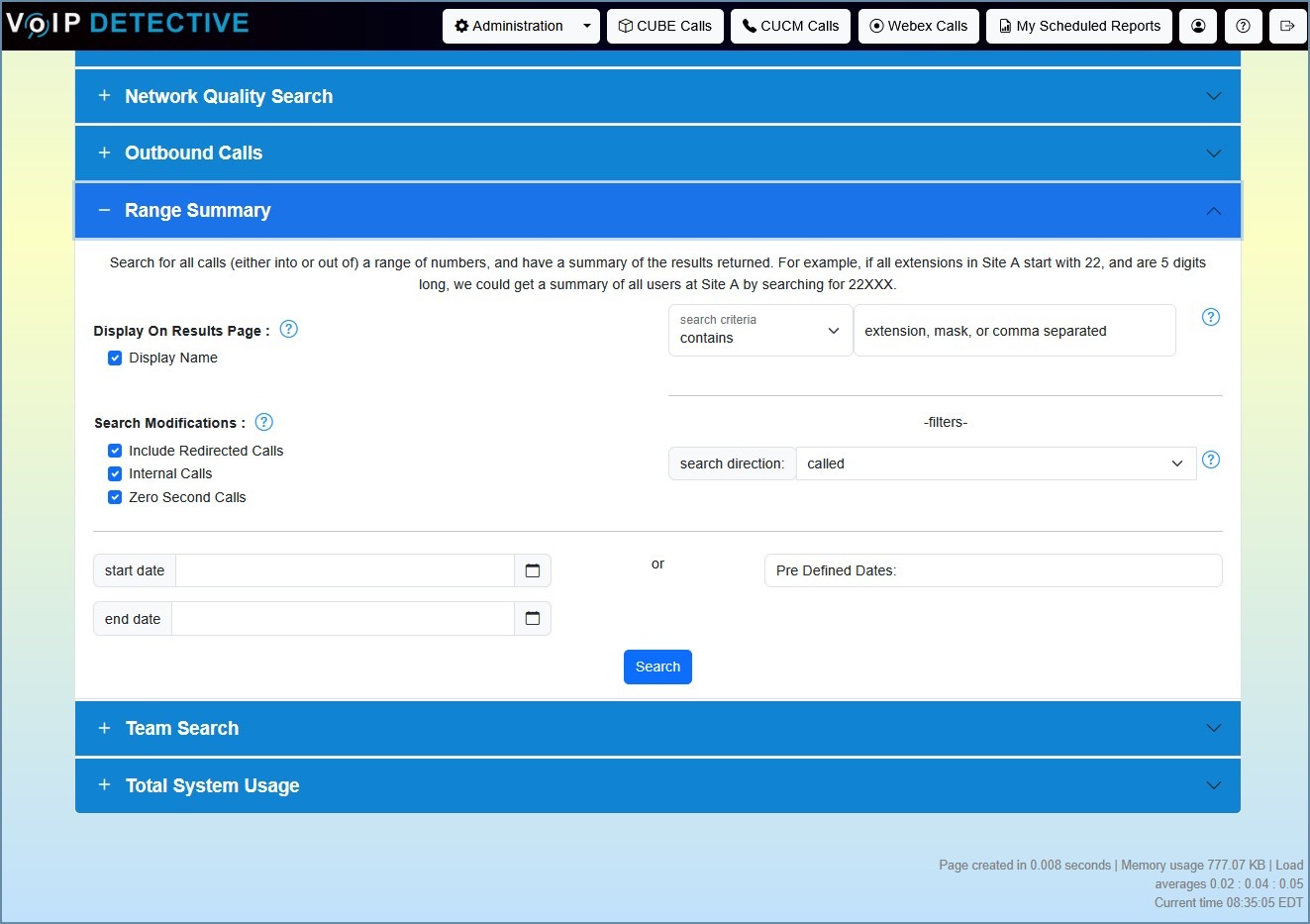
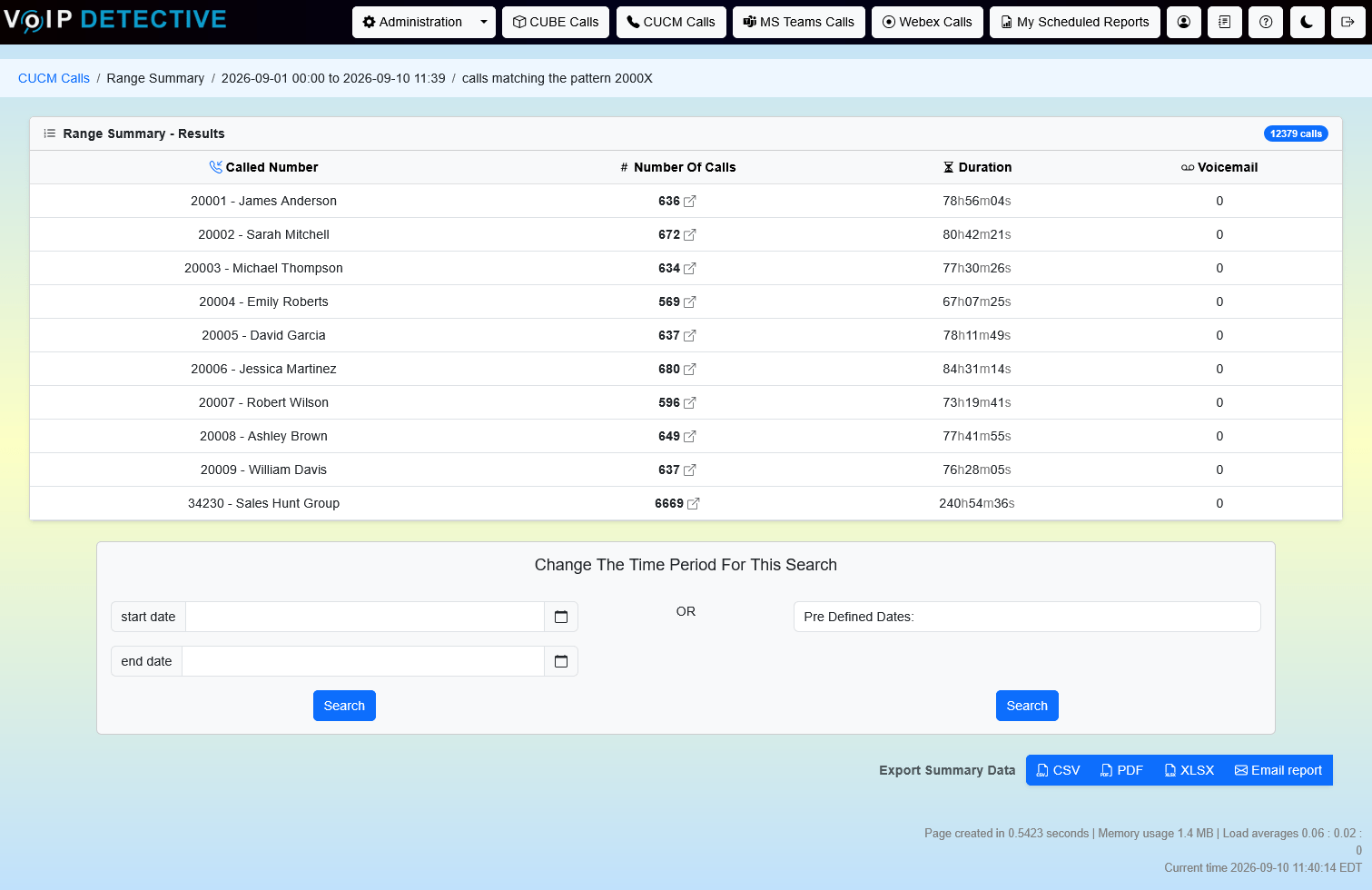
Range Summary Report
This administrator only report can be quite powerful. The idea is to search a range of numbers for either inbound or outbound calls. For example, if all extensions in your New York office are in the range 40000 – 49999, you could search for calls where the calling number matches the pattern 4XXXX. This would quickly show all outbound calls from that range of numbers. You are presented with summary information, and can drill down from there.
The search interface, as well as sample output from a “Range Summary Call” report:
This report is exclusive to VoIP Detective Pro, where it can be exported to CSV, XLSX, and PDF.
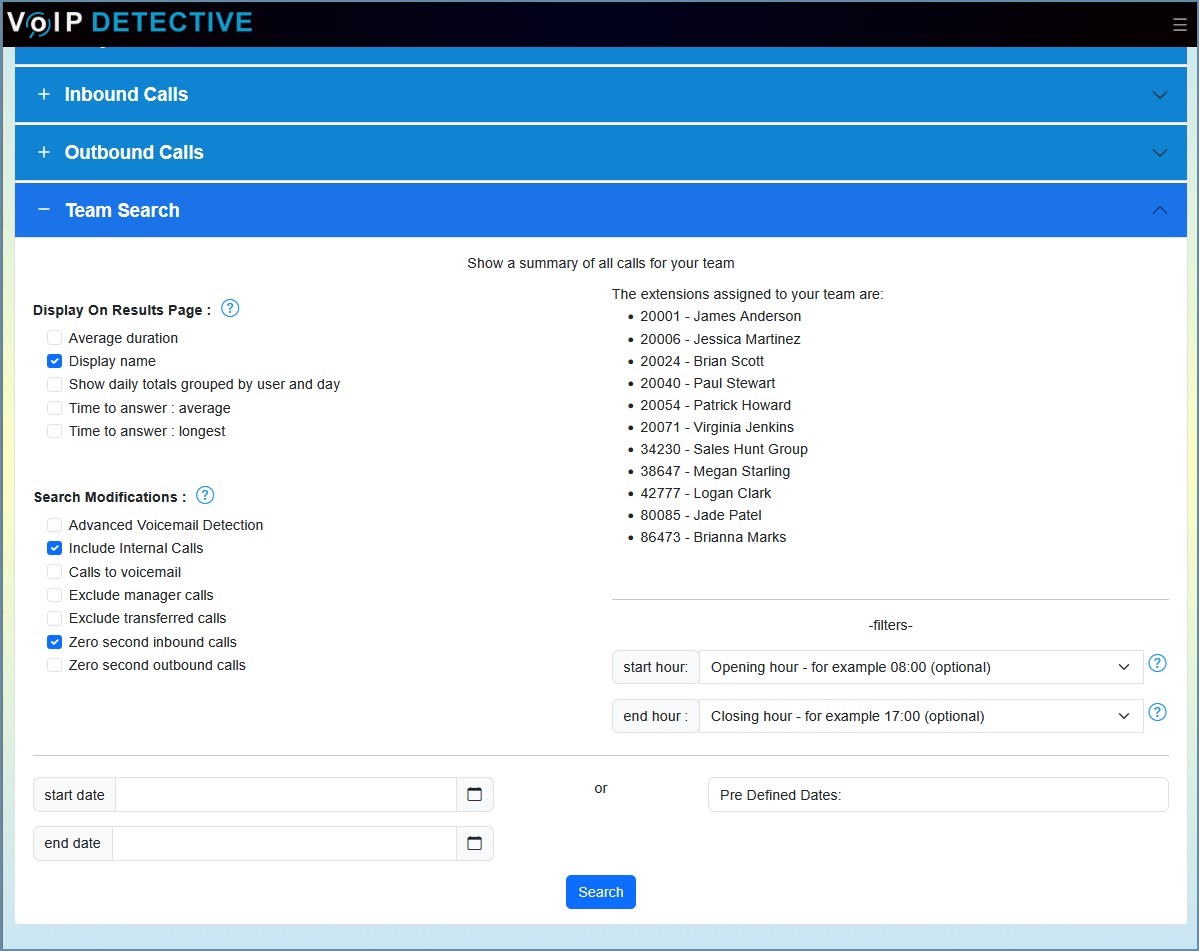
Team Report
One of the most popular reports in VoIP Detective, the team report gives a very easy to understand summary of the calls to and from users on your team. This report is designed for a manager to run, so that they have a high level view of those who report to them, along with the ability to drill down further where needed.
The search interface, as well as sample output from a “team” report:
VoIP Detective Free can export this report into CSV, while VoIP Detective Pro can export to CSV, XLSX, and PDF.
Top Talkers Report
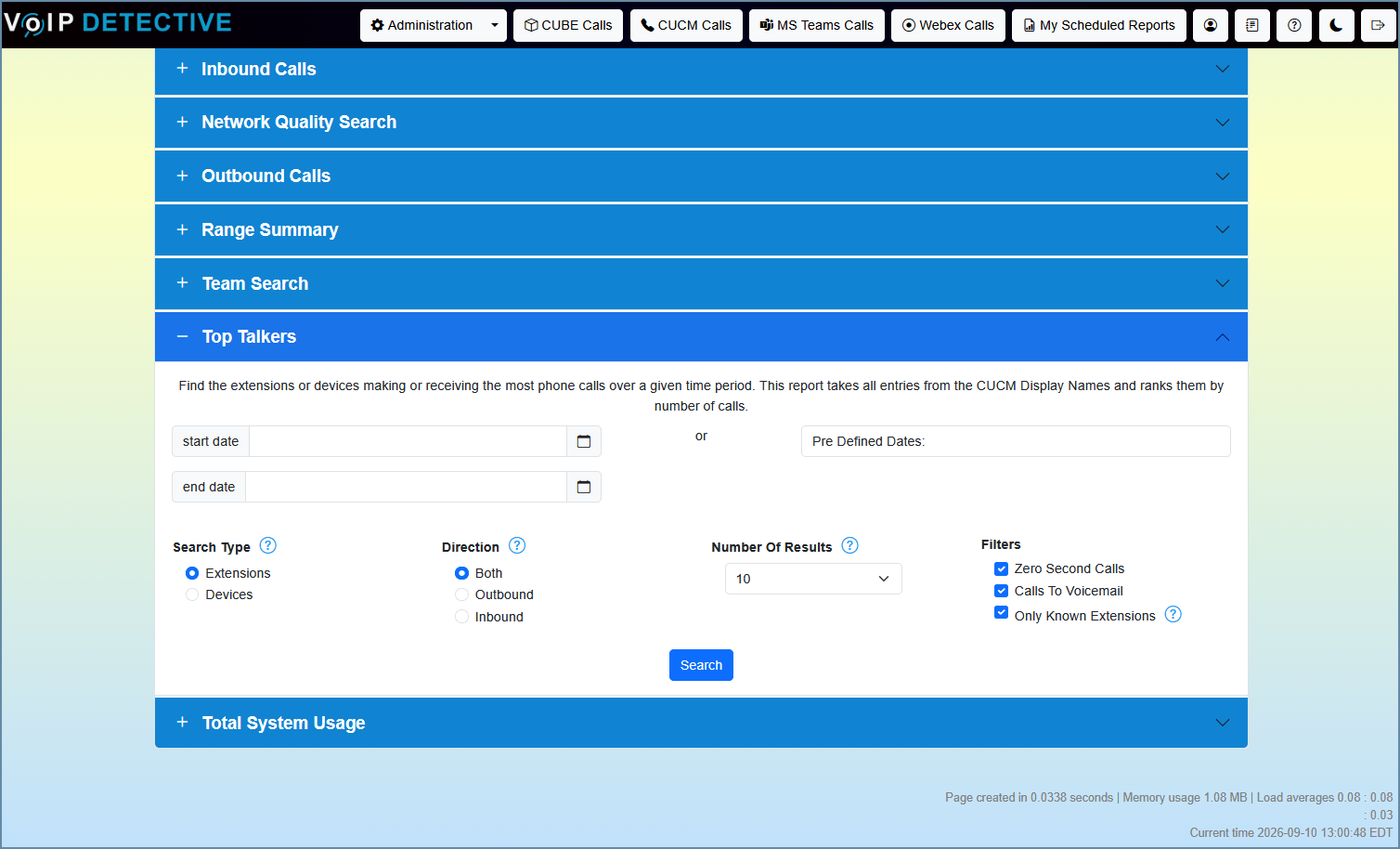
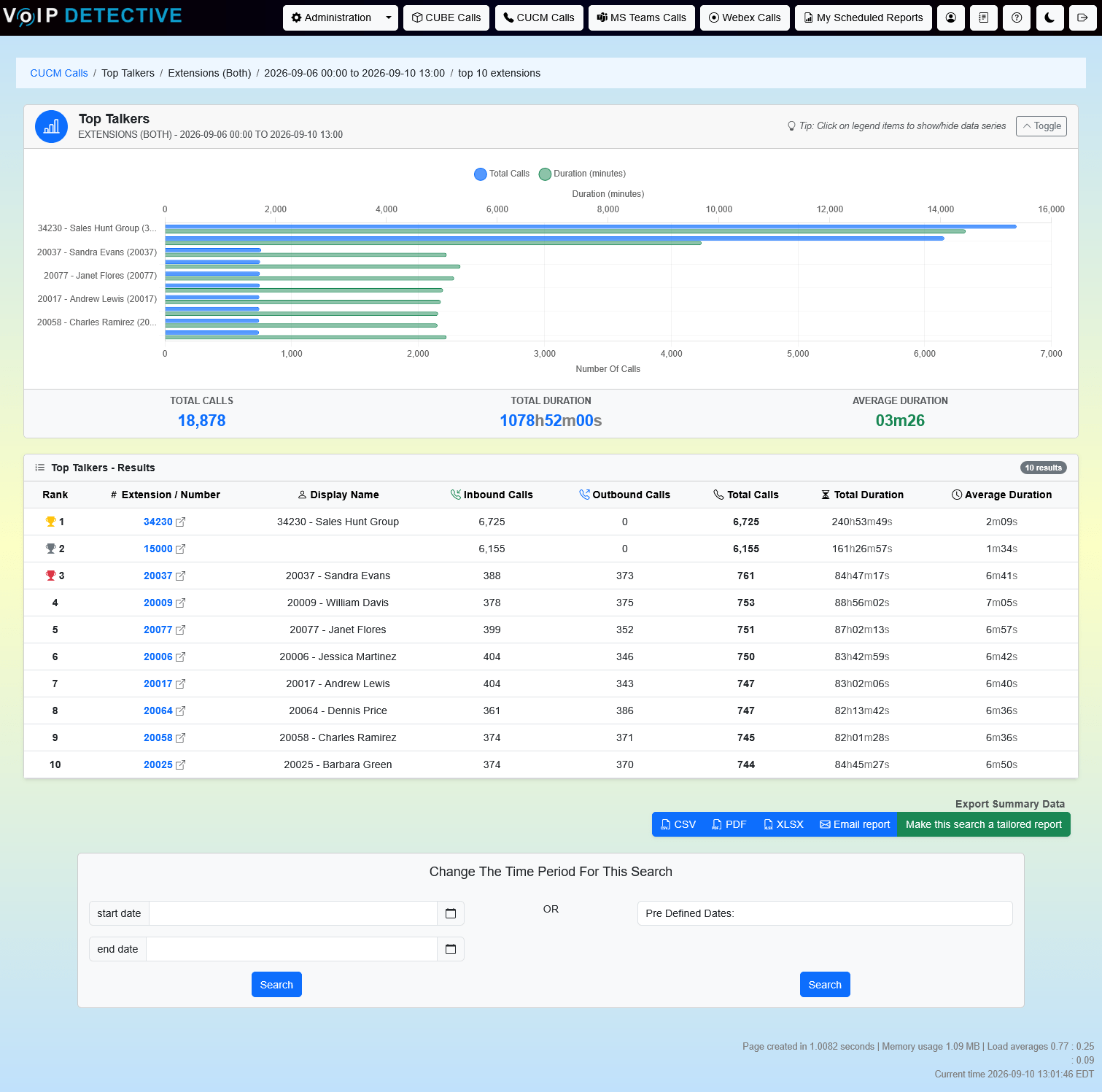
Who is on the phone the most? The Top Talkers Report ranks every extension or device in your CUCM by number of calls over the period you choose, with inbound and outbound counts, total talk time, and average call length for each. Search by extension or by device, look at inbound, outbound, or both, and pick how many results to show. Each result links straight to the Administrator Report so you can see the calls behind the number.
The search interface, as well as sample output from a “top talkers” report:
VoIP Detective Free can export this report to CSV and searches the last two weeks, while VoIP Detective Pro can export to CSV, XLSX, and PDF, search any date range, and schedule it as a tailored report delivered to your inbox.
CUBE Analytics
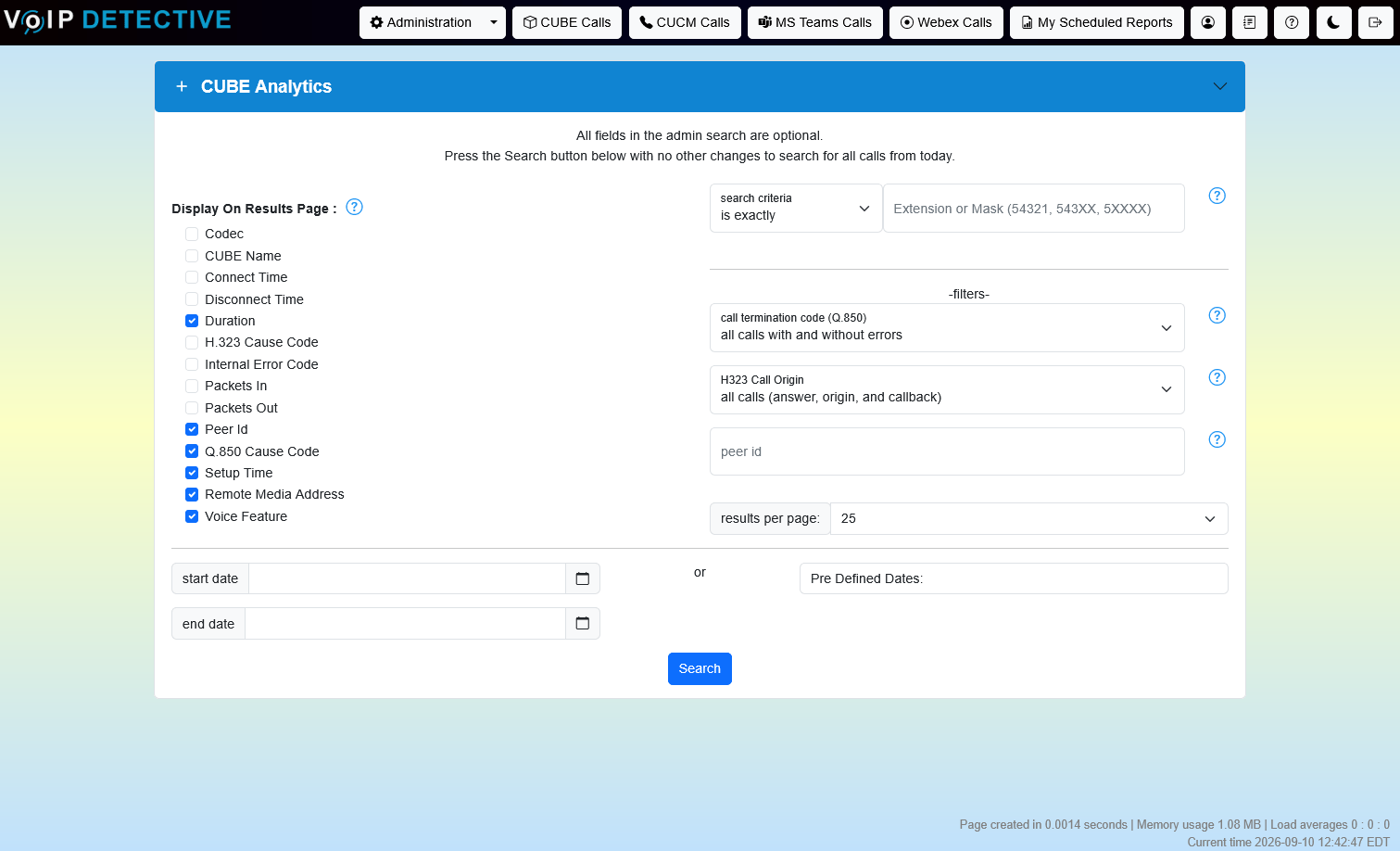
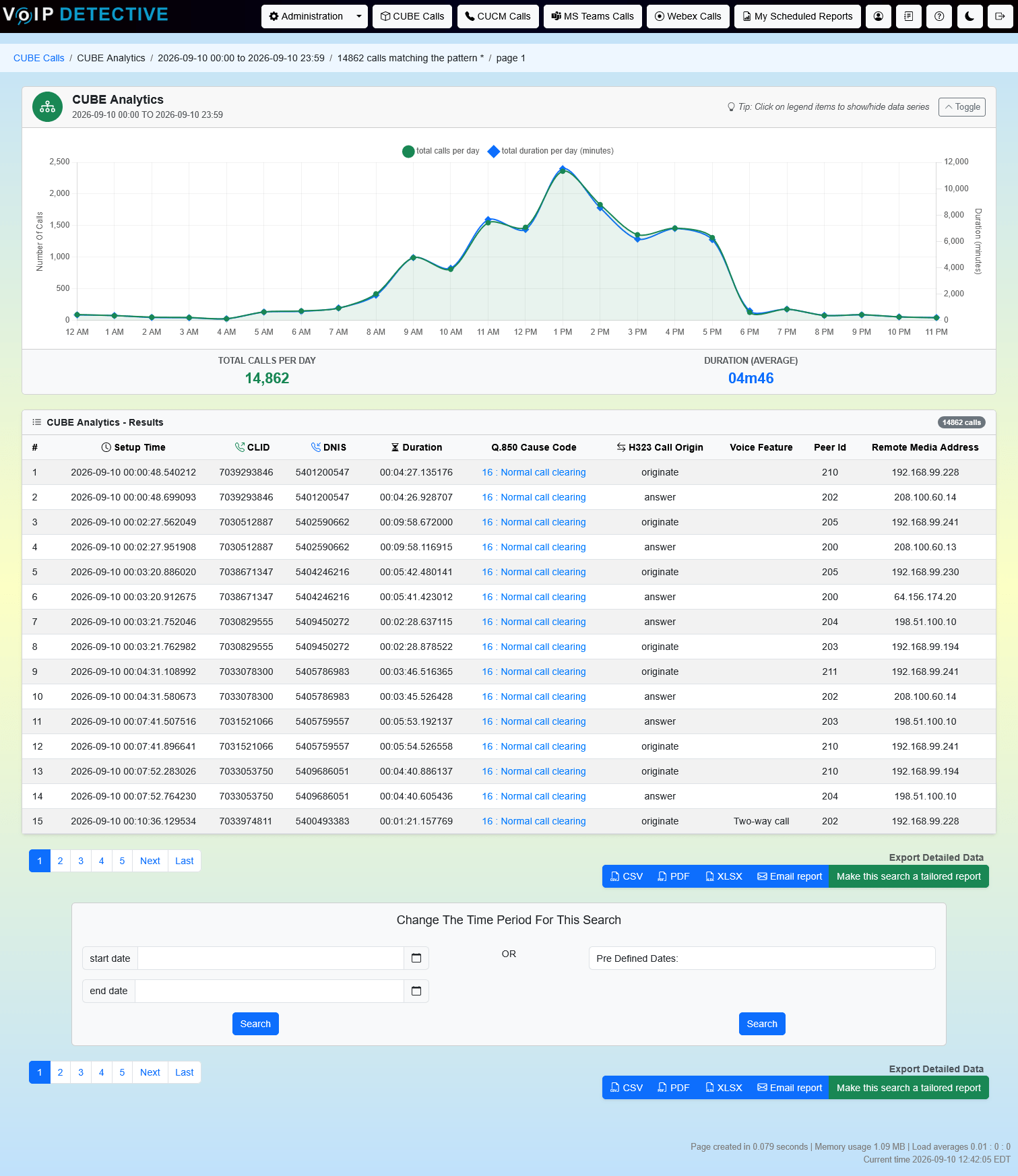
Cisco Unified Border Element (CUBE) is able to create CDR files in a similar fashion to CUCM. These CUBE CDRs cover all calls going into and out of CUBE. This even includes calls that are rejected. VoIP Detective is able to read and analyze these reports, and allow you to easily search calls across your CUBE and schedule reports to make your job much easier.
The search interface, as well as sample output from CUBE Analytics:
Administrators also get a CUBE dashboard with a rolling 24-hour view:
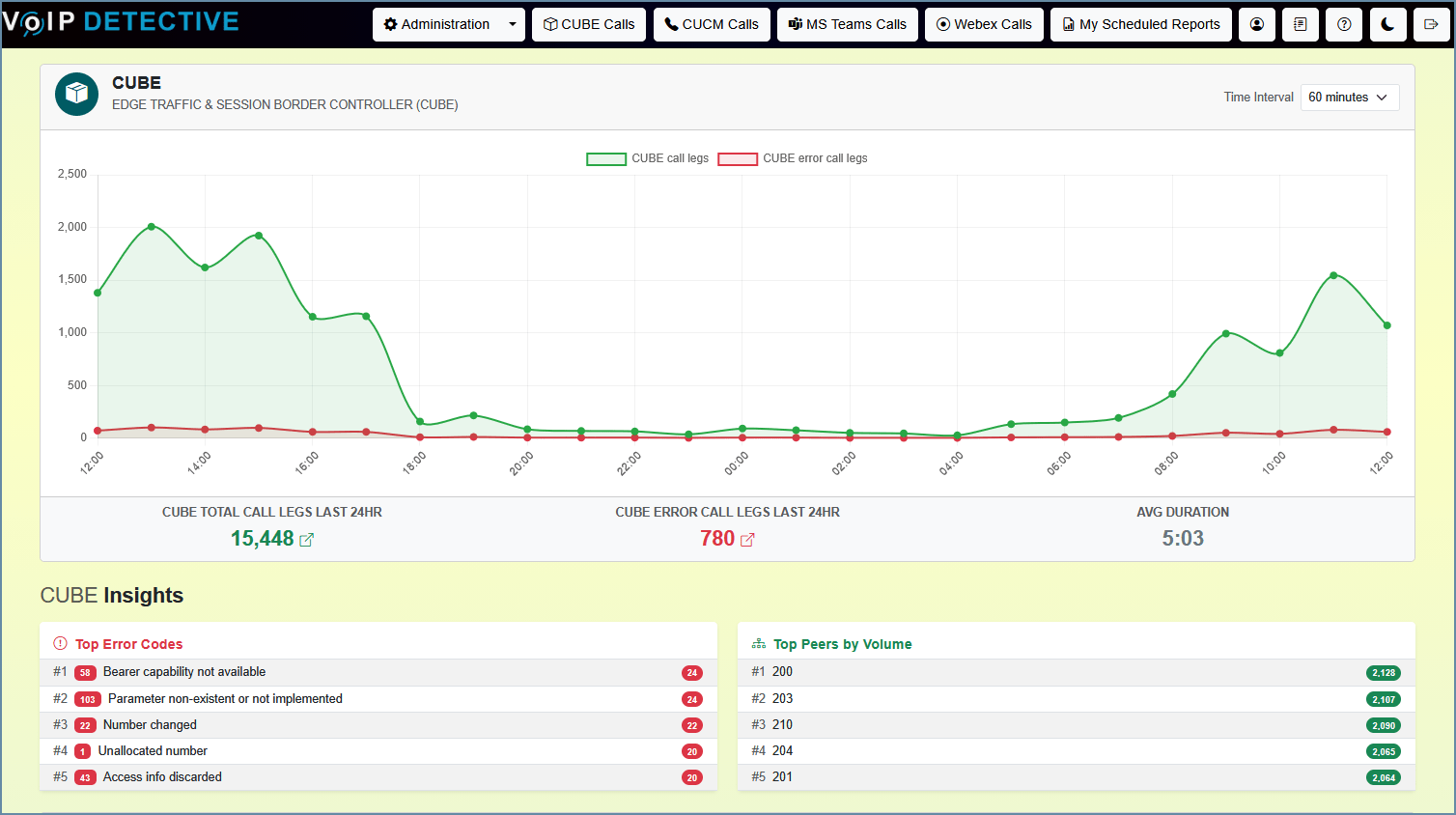
Call legs and error legs over the last 24 hours, plus the top error codes and busiest peers at a glance.
CUBE Analytics has detailed export options including XLSX, CSV, and PDF
Total System Usage Report
Get a summary of calls over a selected time with this report.
Sample output from a total system usage report
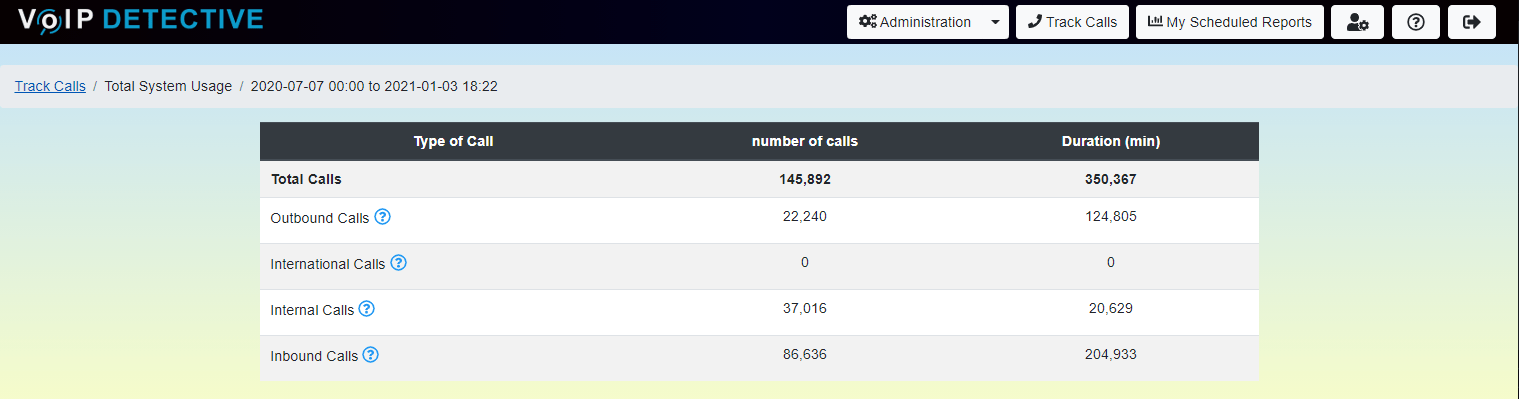
The “total system usage report” will give you a very easy to understand summary of calls made across your phone system.
The total system usage report can only be run through the VoIP Detective web interface, there are no export options at this time.
Questions before you download
Which versions of CallManager are supported?
VoIP Detective works with CUCM 9.0 and later, including the current releases. It uses the standard CDR and CMR records that every CUCM version produces, so upgrades on the Cisco side don’t affect your reports.
How does VoIP Detective get the call records?
You add VoIP Detective to CallManager as a billing server. CUCM then sends its CDR and CMR files automatically, the same way it would to any billing application. Nothing is installed on phones or on the CallManager servers themselves.
Does any data leave my network?
Call records never leave your site. VoIP Detective is a virtual machine that runs in your own environment, and all storage and reporting happen locally. The only outbound connection is a periodic check for software updates to *.voipdetective.com. Pro customers who need a fully offline installation can have that as well. Phone numbers can also be masked from users for privacy or GDPR requirements.
What do I need to run it?
A virtual machine host. VoIP Detective ships as a pre-built VM for VMware, Hyper-V, Nutanix, Proxmox, and Linux KVM. There’s no database or web server to build; everything is inside the VM.
How is Pro licensed?
Pro is $1,499 per year per VoIP Detective installation, regardless of how many phones or users you have. It includes CUBE analytics, the UCCX wallboard, scheduled reports, unlimited retention, and support. Upgrading from Lite is a license key; nothing is reinstalled.
What’s included in support?
Pro includes ticket-based support from the people who build the product, plus every version upgrade for as long as your subscription is active. Lite users have the online knowledge base and video library.
How long does setup take?
Plan on about two hours from download to your first report: deploy the VM, run the installer, and add the VM to CallManager as a billing server. Reports appear as soon as the first records arrive.
What does the free Lite version include?
Every report that isn’t marked Pro-only on this page, against your most recent seven days of calls, with unlimited users. Pro-only reports are visible in the interface but locked until a license is added. Downloading requires an email address and nothing else.
See your own CUCM call data today
Download the free Lite version. It never expires, has no limit on users, needs only an email address to download, and runs the core reports on this page against your last seven days of calls. Deploy the virtual machine, add it to CallManager as a billing server, and reports begin filling in as soon as the first records arrive. When you want unlimited retention and scheduled reports, Pro is one license key away.
Questions first? Ask us directly or watch the video overview.